
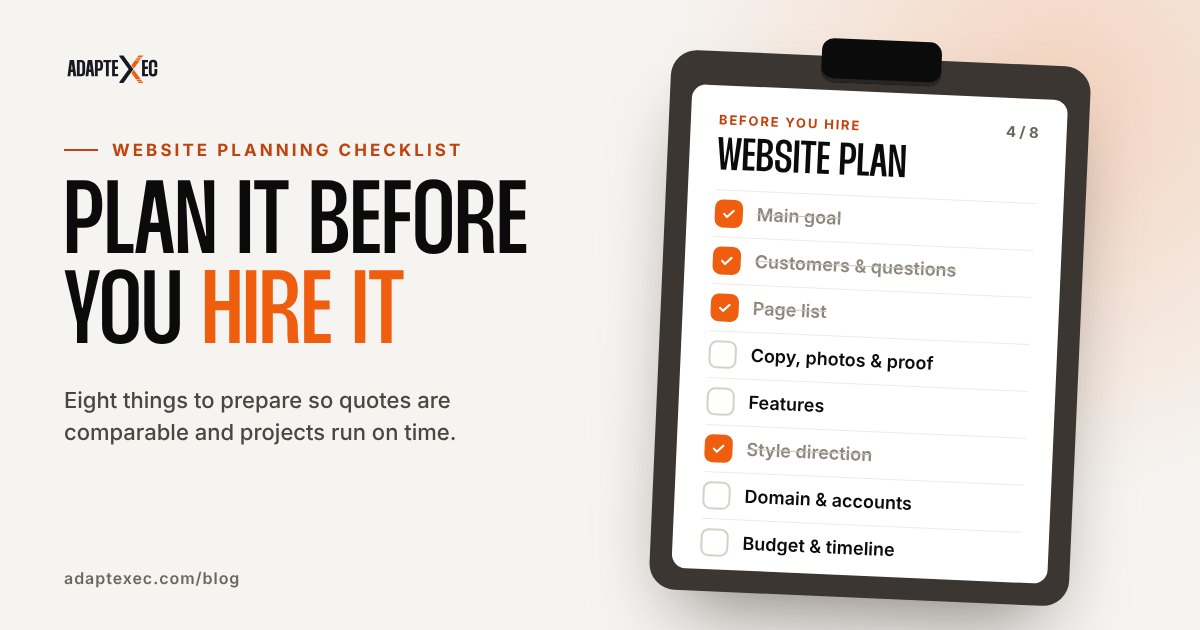
A good website planning checklist covers eight things to prepare before you hire a designer: the site’s main goal, your customers, a page list, your content (words, photos, proof), the features you need, a style direction, your accounts and ownership details, and a realistic budget and timeline. Gather those and you’ll get quotes you can actually compare, a faster project and fewer surprises. Skip them and you pay for the planning anyway, just later and at a higher hourly rate.
We plan and build websites for small businesses in Scottsdale, Phoenix and nationwide. This is the same checklist we wish every client arrived with. It works whether you hire us, a freelancer or a big agency, and you can work through most of it in an afternoon.
Key takeaways
- One main goal beats five. Decide the single action the site should drive (call, book, quote, buy) before anything else.
- List page types, not just pages. Designers price unique layouts; thirty pages might be six templates.
- Content is the usual bottleneck. Decide early who writes copy and where photos come from.
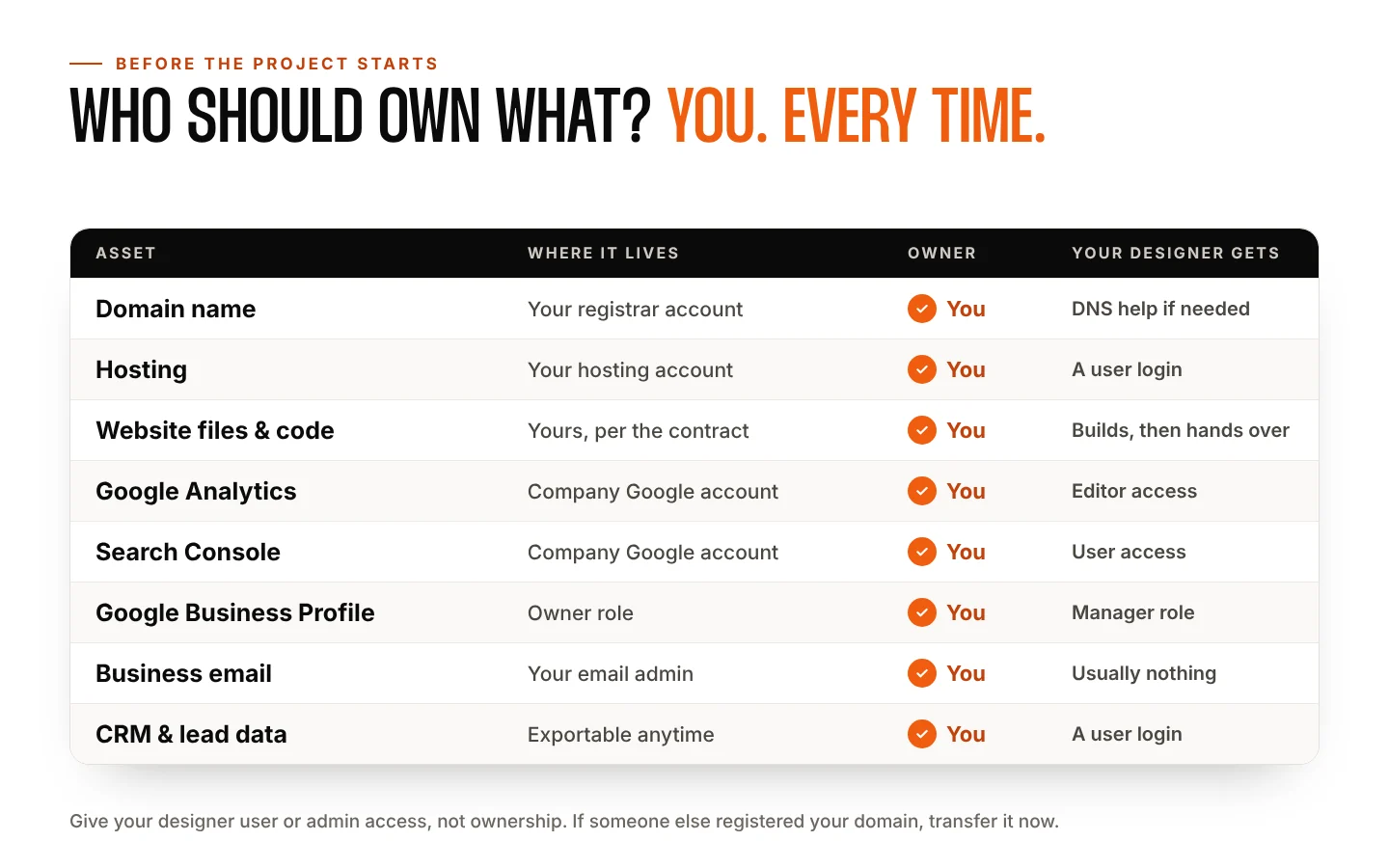
- Own your accounts. Domain, hosting, analytics and Google Business Profile should be in your name before the project starts.
- Replacing a site? Map the old URLs. Google recommends planned permanent redirects to protect existing rankings.
1. Your goal and your customers
Everything else follows from this section, so give it real thought.
- The one main action. What should most visitors do? “Call for a same-day appointment” or “request a free roof inspection” is a goal. “Look professional” isn’t.
- Secondary actions. Newsletter sign-ups, job applications, donations. List them, but rank them below the main one.
- Who your best customers are. Two or three sentences each: who they are, what problem brings them to you, what they worry about before buying.
- The questions they always ask. Write down the ten questions you answer on the phone every week. They become page content and FAQs.
- Where you work. Cities and areas you serve, and whether customers come to you or you go to them.
- How you’ll measure success. Calls, form submissions, bookings or sales per month. Note today’s numbers if you have them.
2. Your page list (sitemap)
Sketch the pages you need at launch. Then group them by type, because that’s what drives design time and cost. A typical service business might need:
| Page type (unique layout) | Example pages | Launch or later? |
|---|---|---|
| Home | Home | Launch |
| Service page template | Drain cleaning, water heaters, repiping, leak detection | Launch |
| Service area template | Scottsdale, Tempe, Mesa (only with real local work to show) | Later is fine |
| About / team | About us, meet the team | Launch |
| Proof | Reviews, project gallery, case studies | Launch |
| Conversion | Contact, book online, request a quote | Launch |
| Content | Blog, guides, FAQs | Later is fine |
An example for a home-services business. Nineteen pages here use just seven layouts.
Separating “launch” from “later” is one of the easiest ways to keep a first project affordable. Our guide to what a website costs in 2026 explains why unique layouts move a quote more than page count.
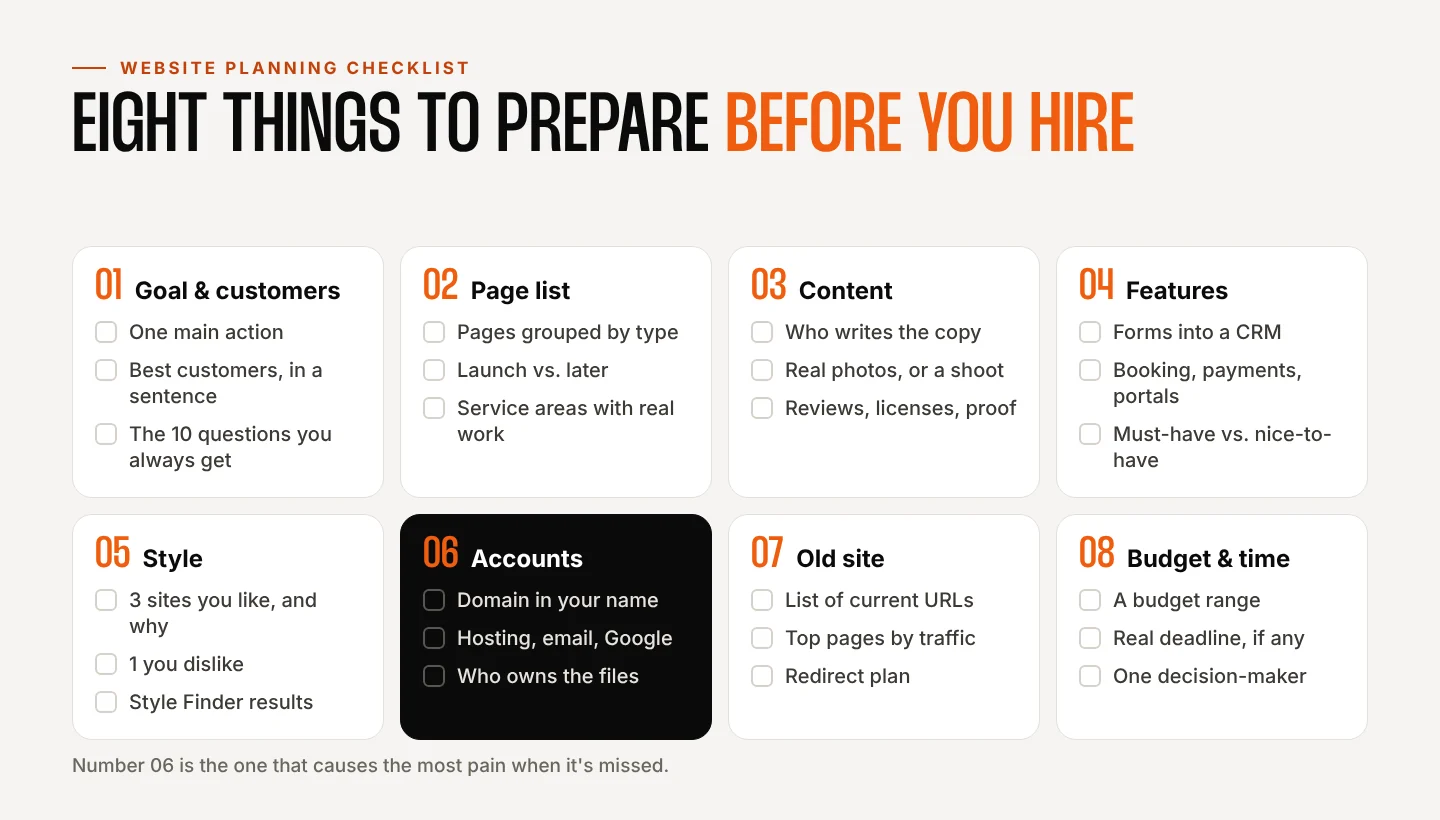
3. Your content: words, photos and proof
Content delays more website projects than anything else. Decide now who handles each piece.
- Copy. Will you write it, will the designer, or will you hire a copywriter? If you write it, aim for drafts of the home page and one service page before design starts.
- Photos. Real photos of your team, your work and your location beat stock every time. Do you have them, or do you need a shoot? Phone photos in good light are fine for project galleries.
- Proof. Collect reviews (with permission to quote), licenses, certifications, awards, years in business and before-and-after examples.
- Logo and brand files. A vector logo (SVG, AI or EPS), brand colors and fonts. If you don’t have them or don’t love them, sort that out first; our marketing and branding work often starts here.
- Accessibility. Ask for readable contrast, labeled forms and descriptive image text from the start. It’s a common gap: WebAIM’s 2026 scan found detectable WCAG failures on 95.9% of the top one million home pages (WebAIM).
- Legal pages. Privacy policy and terms, especially if you collect form data or take payments.
4. The features the site needs
Features are where quotes separate, so be specific. For each one, note whether it’s a must-have at launch or a nice-to-have.
- Contact and quote forms. Where should submissions go? An inbox, or a CRM with the lead’s source?
- Online booking or scheduling. Which calendar or system do you already use?
- Payments or deposits. One-time, recurring, invoices?
- E-commerce. How many products? Shipping, taxes, inventory?
- Client logins or portals. What do customers need to see or do after they sign up?
- Integrations. CRM, email marketing, accounting, scheduling or industry software that needs to talk to the site.
- Calculators, quizzes or estimators. Helpful tools that turn visitors into leads.
- Multiple languages or locations.
If you’re not sure what’s realistic, our live demo sites show working examples by industry: booking flows, ZIP-code service checkers, estimate funnels and more, each wired to a CRM. They’re fictional brands, so borrow ideas freely.
5. A style direction
“Clean and modern” describes about 90% of design briefs and helps nobody. Instead, bring examples.
- Three sites you like, with one sentence on what you like about each (the photos, the colors, how easy it is to book).
- One or two sites you dislike, and why. This is often more useful.
- A named style. Take the seven-question Style Finder in our Website Style Guide and share your top matches. Our guide on how to choose a website style walks through the trade-offs.
- Anything that’s fixed: existing logo, brand colors, fonts or brand guidelines.
6. Accounts, access and ownership
This section isn’t exciting, and it’s the one that causes the most pain when it’s missed. Get these in order before work starts.
- Domain name. Know which registrar it’s with and make sure it’s registered to you, with current contact details. ICANN, which oversees domain names, says registrants must keep their contact and account information accurate and current (ICANN). If a former web person registered it, transfer it to your own account now.
- Hosting. Who will host the new site, and whose name is the account in?
- Email. If your email runs on the same domain, make sure nobody changes DNS settings without accounting for it.
- Google accounts. Google Analytics, Search Console and Google Business Profile, all owned by a company account you control, with the designer added as a user.
- Logins for the current site and any tools that need connecting (booking, CRM, payments).
- Ownership terms. Ask every designer in writing: who owns the finished site, files and code? Is any monthly plan required to keep it online?
7. If you’re replacing an existing site
A redesign can quietly wipe out years of search rankings if old pages disappear without redirects. Google’s own guidance for site moves is to prepare a mapping from each old URL to its new one and use server-side permanent redirects, keeping them for generally at least a year, and to expect some temporary ranking fluctuation while Google catches up (Google Search Central).
- Export a list of current URLs and note the pages that get the most traffic and leads (Search Console and Analytics will tell you).
- Decide what happens to each page: keep, merge or retire, and where it redirects.
- Save what’s working. Pages that rank, reviews and content worth keeping.
- Ask designers how they handle redirects. If the answer is vague, keep asking. Our SEO team builds the redirect map into every redesign we do.
8. Budget, timeline and decision-makers
- A budget range. Sharing a range isn’t a negotiating mistake; it lets a designer suggest what fits instead of guessing. Include room for running costs like hosting, domain and any plugins.
- A real deadline, if there is one. A trade show, a new location, a busy season. As a rough guide, a starter site often takes 2 to 5 weeks and a full marketing site 5 to 9 weeks, mostly depending on how quickly content arrives.
- Who approves what. Name one decision-maker. Projects with five approvers take longer and cost more.
- Your availability. Block time for reviews. A week of silence during design adds a week to launch.
Questions to ask every designer you interview
- What exactly is included? Pages, layouts, features, rounds of revisions, content help.
- Who owns the site and accounts when we’re done?
- What does it cost to run for a year after launch, and what’s optional?
- How will you test it on phones and measure speed?
- How will form submissions reach us, and can they go into a CRM?
- How do you handle redirects and SEO basics at launch?
- Can I edit content myself afterward?
How AdaptExec plans a website with you
We start every website project with a short planning conversation built around this checklist, then send a clear scope and a custom quote. If you’ve already used the Website Planner, we start from your plan instead of a blank page.
- Websites start around $900; every quote is custom to your scope.
- You own it all: the site, the domain, your data. No required monthly plan and no long-term contract.
- Connected from day one: forms that land in the CRM you use, or a custom one we build.
Website planning checklist FAQ
What should I prepare before hiring a web designer?
At minimum: the site’s main goal, a list of pages you need at launch, who will provide copy and photos, the features you need (booking, payments, forms into a CRM), two or three example sites you like, access to your domain and current site, and a budget range.
How long does it take to plan a website?
A few hours for a small business site if you work through a checklist like this one. Our free Website Planner takes about five minutes and gives you a one-page plan to share.
Do I need to write my own website content?
No, but someone has to. Many owners write rough drafts and have the designer or a copywriter polish them. Deciding this early prevents the most common project delay.
Should I tell a web designer my budget?
Yes, as a range. It helps them propose a scope that fits, phase features you can add later, and avoid quoting a site you can’t use. Compare quotes on scope and three-year cost, not just the first number.
What’s the biggest planning mistake?
Not securing ownership of the domain and accounts. If someone else controls them, switching designers or fixing problems becomes slow and expensive. Make sure they’re in your name before work begins.
Sources
- Google Search Central: Site moves with URL changes, accessed October 2026.
- WebAIM: The WebAIM Million, 2026 report (data from February 2026).
- ICANN: Registrants’ Benefits and Responsibilities, accessed October 2026.