
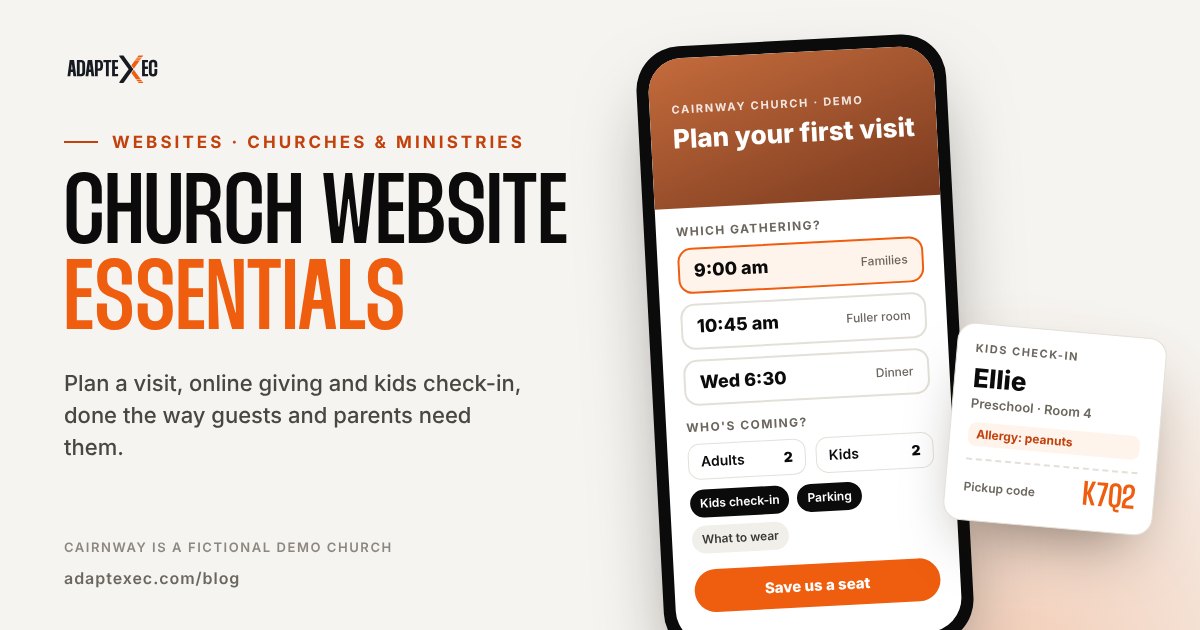
The church website essentials come down to three jobs: help a first-time guest plan a visit without guesswork, let members give online in under a minute, and show parents exactly how kids check-in keeps their children safe. Service times, address, what you believe and a way to reach a real person belong on the home page. Everything else on a church website is secondary to those.
This guide is for pastors, church administrators and the volunteers who end up running the website. Adam, our founder, is heavily involved in his own church in Scottsdale, so we’ve seen these questions from the pew and from the back office. We’ll walk through each essential, what to put on the page, and how the pieces connect behind the scenes, using our fictional Cairnway Church demo as a working example.
Key takeaways
- Your website is the first visit. Thom Rainer of Lifeway reports that roughly seven in ten first-time guests say they looked at the church’s website first.
- Put times, address and beliefs on the home page. Missing or outdated service times are one of the most common reasons guests don’t come.
- A “Plan a visit” form beats a contact form. Ask when they’re coming and who’s with them, then have someone ready at the door.
- Explain kids check-in on the website. Parents decide about safety before they decide about the sermon.
- Online giving should hand off to a secure provider and take a few taps on a phone.
Why the website is now your front door
Ask first-time guests what led them to visit and you’ll hear a familiar answer. Thom Rainer, writing for Lifeway Research, says about seven out of ten first-time guests tell his team they visited the church’s website first, and calls the website a determinative factor in where people choose to go (Lifeway Research). It’s an observation from the churches he works with rather than a national survey, but it matches what most pastors hear on Sunday mornings.
Online attendance is part of the picture too. Pew Research Center found that 27% of U.S. adults were still watching religious services online or on TV, including 10% who watch online without attending in person (Pew Research Center). For many of those people, your sermon page is the church until they’re ready to walk in.
Rainer’s list of common church website mistakes reads like a checklist of what guests look for: service times and address that are hard to find, outdated information (his example was an Easter schedule still up in autumn), no clear statement of beliefs, nothing about children’s ministry, poor photos and hidden contact details. Fix those and you’re ahead of a lot of churches.
The home page: answer five questions in five seconds
A guest on their phone in the parking lot of another church should be able to answer these without scrolling far:
- When? Every gathering time, including midweek services. If times change seasonally, update them the same week.
- Where? A full street address that opens in a map app, plus a note about parking and which door to use.
- What’s it like? Length of the service, what people wear, and whether kids stay in or go to their own rooms.
- What do you believe? A short summary and a link to the full statement.
- Who can I ask? A phone number, a short contact form and, ideally, a named person.
Then give one primary button: Plan your visit. “Watch online” and “Give” can sit next to it, but guests are the people the home page has to serve first.
Plan a visit: turn a curious guest into a welcomed one
A generic contact form asks guests to start a conversation. A plan-a-visit form asks the questions a welcome team actually needs, and makes the guest feel expected. On our Cairnway Church demo the flow takes about a minute:
- Which gathering? Pick a date and a service time, with a one-line note on each (quieter and more families, or a fuller room and later start).
- Who’s coming? Number of adults and kids, plus kids’ age groups so the right rooms are ready.
- What are you wondering about? Tap-to-select topics like parking, what to wear, kids check-in, accessible seating or talking with a pastor.
- How can we reach you? Name, email, optional phone and the best time to contact them.
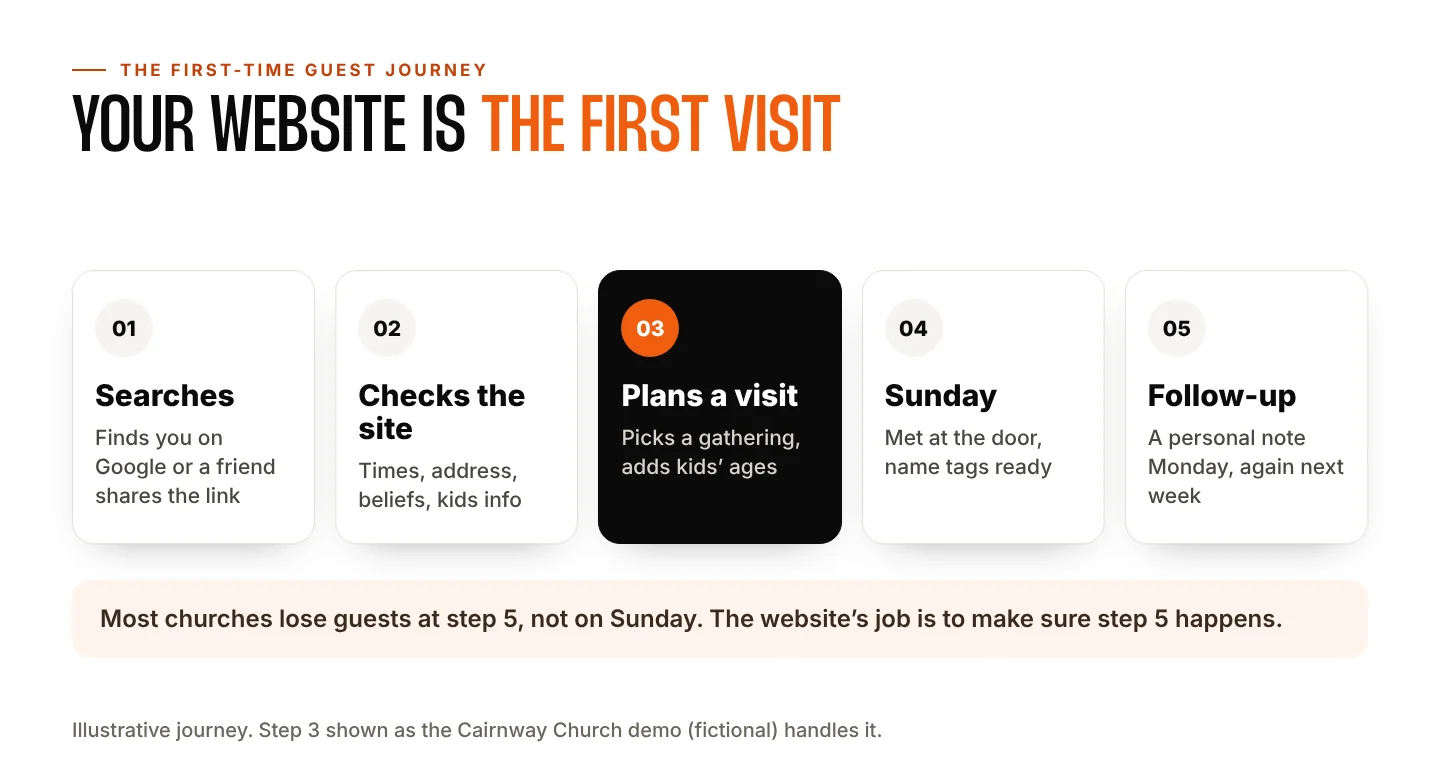
On a live site, that request should land somewhere a person sees it, not just in an inbox. The welcome team gets the family’s name and kids’ ages before Sunday, someone saves a parking spot near the door, and the kids’ name tags are already printed. Then follow up: a short note on Monday, and a second touch a week later. That’s where most churches lose guests, not on Sunday.
Online giving: fast, secure and honest
Giving online should feel as simple as any purchase on a phone. The essentials:
- Two or three taps to give. Preset amounts, a fund selector (general fund, missions, benevolence, building) and a one-time or recurring choice.
- A secure, established giving provider handles the payment. Your website shouldn’t collect card or bank details directly. The site hands off to the provider’s checkout, and the provider handles processing and receipts.
- Recurring giving that’s easy to manage. Givers should be able to change or cancel without calling the office.
- Year-end statements pulled from the giving records, not assembled by hand in January.
- A short, sincere why. A line about what giving supports and a verse goes further than a fundraising thermometer.
On the Cairnway demo, the giving section shows the whole experience but processes nothing. In a live build, it would pass the gift to the church’s chosen giving provider and sync it back to the church database for statements. That connection is the part most church sites skip, and it’s why the finance volunteer ends up re-typing gifts into a spreadsheet.
Kids check-in: show parents how you keep children safe
Parents of young children are making a safety decision long before they make a theological one. Rainer’s advice is to tell parents explicitly on your website how you keep their kids safe and secure, and to let them check in online before they arrive. Your kids page should explain, in plain language:
- Age groups and rooms. Nursery, preschool, elementary and students, with what happens in each.
- How check-in works. A kiosk or a pre-check from a phone, a name tag for the child and a matching pickup tag for the parent.
- Allergies and special needs. Noted at check-in and printed on the tag so every leader knows.
- Who is in the room. Your screening and training policy, and your rule on the number of adults per room.
- Code-matched pickup. Children are released only to an adult with the matching tag, and parents can be paged by their code if needed.
The Cairnway demo includes a sample tag printer so a parent can see the two matching tags before they ever visit. You don’t need that much theater on a real site, but you do need the explanation. A family that understands your process on Thursday walks in calmer on Sunday.
Behind the scenes: one place for every person
The difference between a nice church website and a useful one is what happens after someone clicks submit. Visit plans, prayer requests, serve sign-ups, small-group interest and giving all describe the same people. When they land in five different inboxes and apps, people slip through.
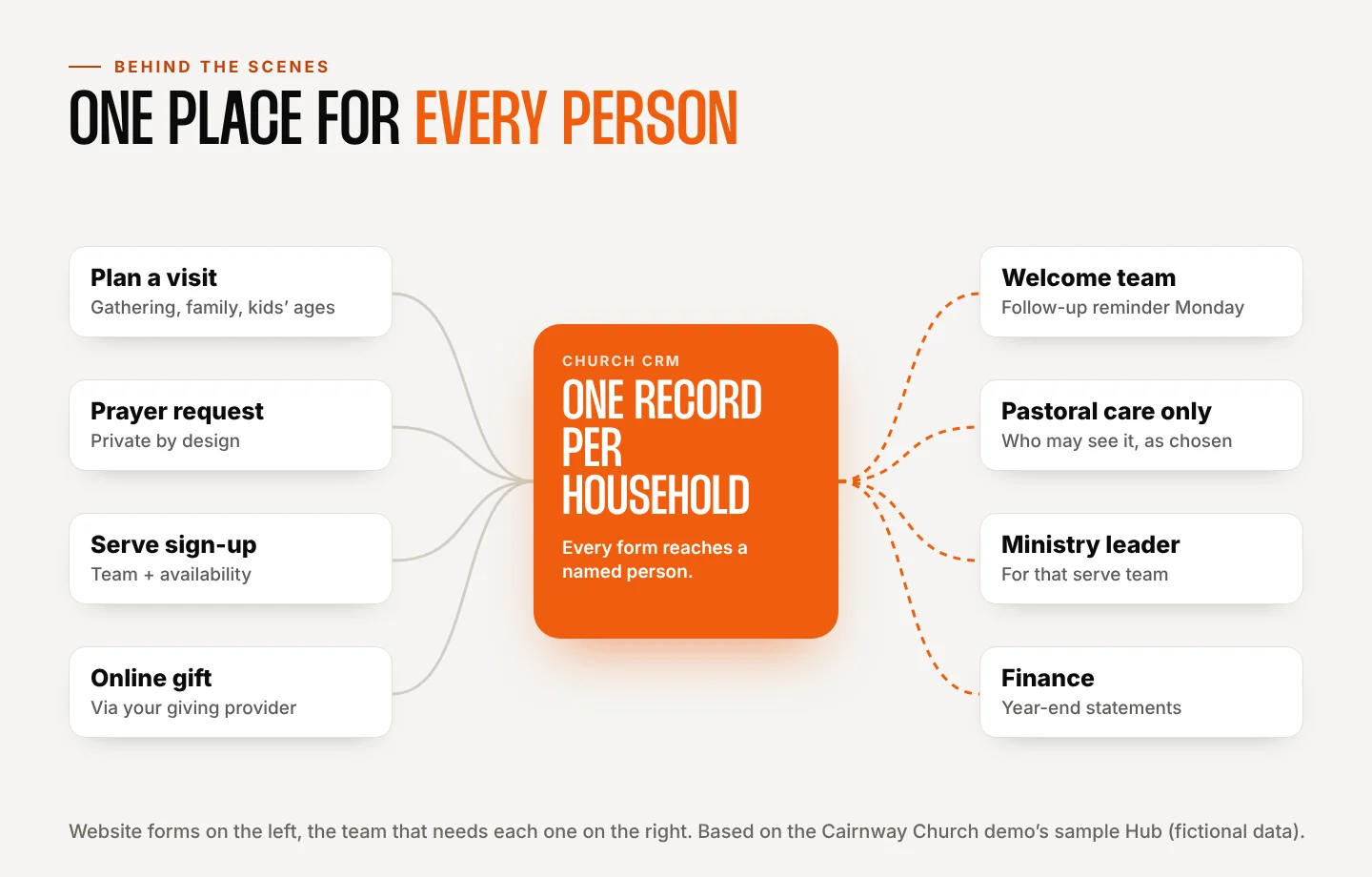
A church CRM (sometimes called church management software) keeps one record per person or household and routes each request to the right team:
- Visit plans go to the welcome team with a follow-up reminder.
- Prayer requests go only to pastoral care, with clear privacy settings the person chose.
- Serve sign-ups go to the ministry leader for that team.
- Group interest goes to the group leader nearest that family.
Many churches use off-the-shelf church management software, and for plenty of congregations that’s the right call. Others outgrow it or pay for modules they never use. A custom church CRM makes sense when your ministry flow is specific or you want the website and database to work as one system you own. Our Cairnway demo includes a sample “Hub” showing exactly that, with sample data only.
If you stay with off-the-shelf software, connect it to the website so staff aren’t updating two systems. For example, we connected Desert Bible Church’s website to Breeze ChMS through its API, so events and people records update once instead of in two places, and in many cases a multi-step staff task became one step.
Also worth having (once the essentials work)
- A searchable sermon library by book, passage and topic, with notes or a small-group guide.
- A small groups finder filtered by night, area of town and stage of life.
- An events calendar that someone actually keeps current.
- A private prayer request form with a clear statement of who sees it.
- Real photos of your people and building. Rainer specifically warns against images pulled from a Google image search.
- Accessibility. Readable type, good contrast, captions on video and forms that work with a keyboard. The W3C points out that accessibility helps older people with changing abilities and anyone in situations like bright sunlight, not only people with disabilities (W3C Web Accessibility Initiative).
Local search matters too. People search “church near me” and “churches in Mesa.” A complete Google Business Profile with correct service times and real photos is free and often seen before your website. Our local SEO guide covers the basics.
Church website essentials checklist
| Area | Must have | Nice to have |
|---|---|---|
| Home page | Times, address, beliefs link, contact, “Plan your visit” button | Countdown to the next gathering, short welcome video |
| Plan a visit | Gathering, who’s coming, kids’ ages, contact details, follow-up | Reserved guest parking, host at the door |
| Kids | Age groups, check-in and pickup process, safety policy | Online pre-check-in |
| Giving | Secure provider, funds, recurring option, statements | Giving synced to your church database |
| Grow and serve | Groups and serve teams with a way to sign up | Groups finder, reading plans |
| Behind the scenes | Every form reaches a named person | One CRM for visits, prayer, serving and giving |
How AdaptExec builds church websites
We design custom websites for churches and ministries, and when it helps, we connect them to a church CRM so every visit plan, prayer request and sign-up reaches a real person. Click through the Cairnway Church demo to see the full experience (it’s a fictional church, and nobody is contacted when you try the forms). Other working demos are on our demos page.
Websites start around $900 and custom CRMs around $1,500, and every quote is custom. Once a project is paid in full, the church owns what we build. There’s no long-term contract and no required monthly plan; optional support is there if your team wants it. For budgeting help, see our website cost guide, and to get your content and accounts ready before you hire anyone, use our website planning checklist.
Church website FAQ
What should be on a church website home page?
Service times, a full address with parking notes, a short statement of beliefs with a link to the full version, a way to contact a real person, and a clear “Plan your visit” button. Add what a first Sunday is like and what you offer kids.
Is it safe to take online donations on a church website?
Yes, when the payment is handled by an established, secure giving provider. Your website should hand off to the provider’s checkout rather than collecting card or bank details itself. Then sync gifts back to your church records for year-end statements.
Should our website explain kids check-in?
Yes. Parents want to know how check-in, allergies, volunteer screening and pickup work before they visit. A clear explanation, plus online pre-check-in if your system supports it, makes a first visit much easier for families.
How much does a church website cost?
It depends on pages, features and integrations. At AdaptExec, websites start around $900 and custom CRMs around $1,500, and every quote is custom. Our website cost guide breaks down typical ranges by project size.
Do we need a church CRM?
If guest follow-up, prayer requests and volunteer sign-ups are getting lost between inboxes, yes. Many churches do well with off-the-shelf church management software. A custom CRM makes sense when your ministry flow is specific or you want your website and database to work as one system you own.