
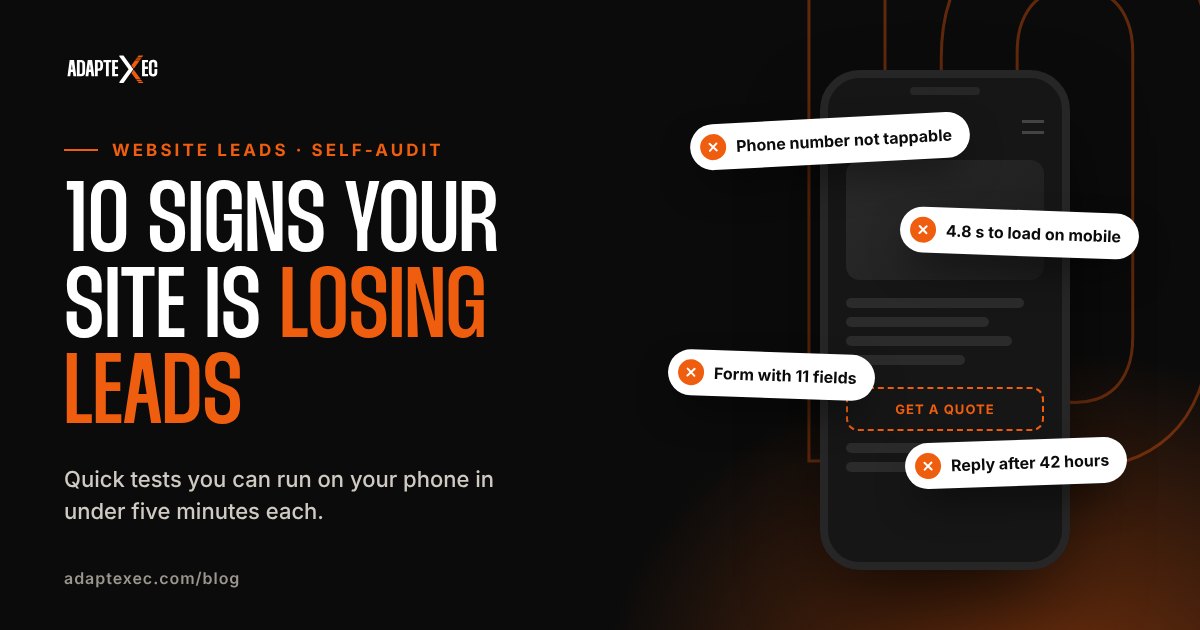
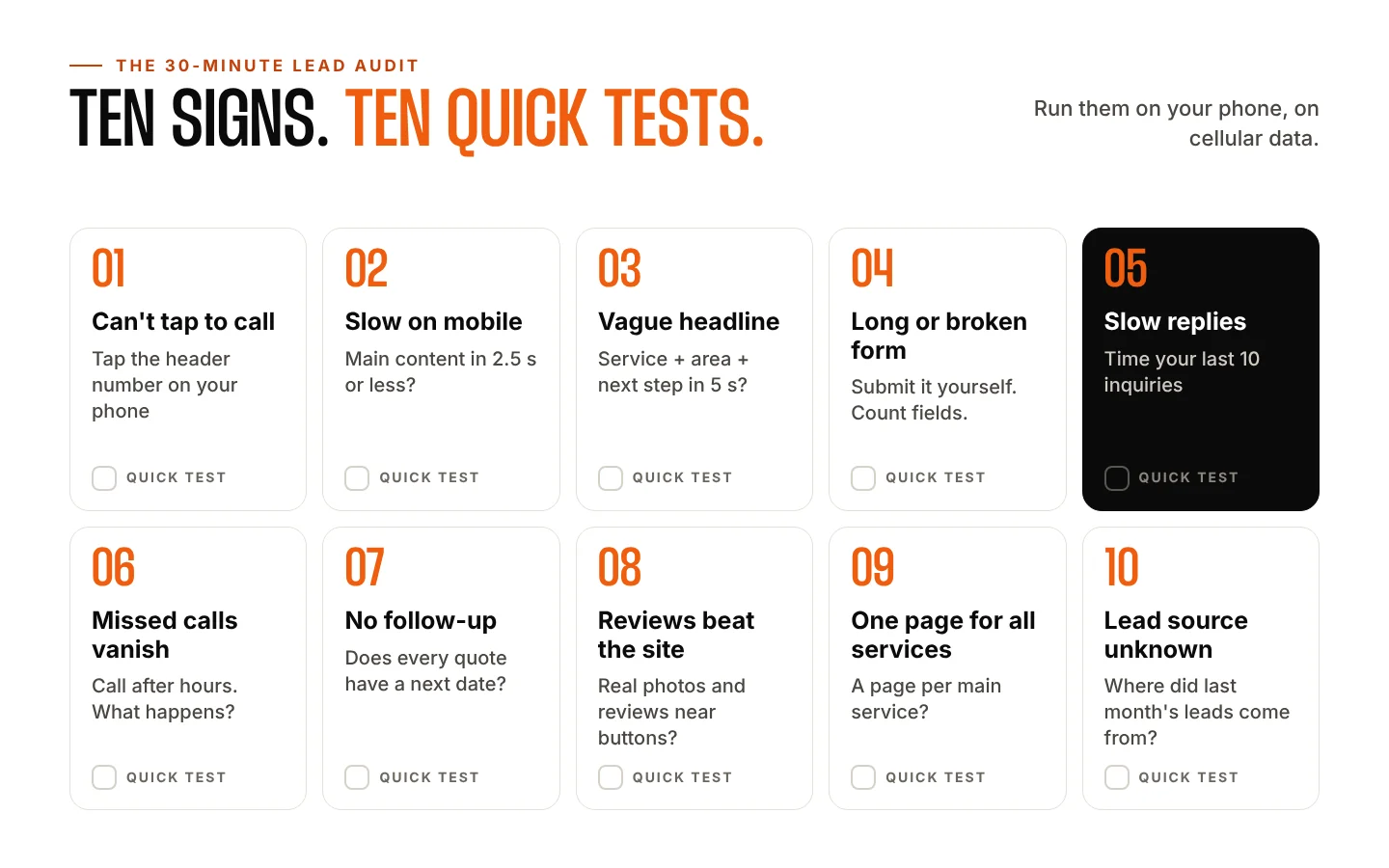
If your website is not getting leads, the cause is rarely “not enough traffic.” More often the site is quietly losing the people who already found it: a phone number you can’t tap, a page that takes too long to load on a phone, a form that asks for too much, or an inquiry that sits unanswered for a day. These 10 signs cover the leaks we see most, each with a quick test you can run in under five minutes and the fix.
We build and fix websites for service businesses around Scottsdale, Phoenix and beyond, and most of the “our website doesn’t work” conversations we have end up on this same short list. You don’t need a redesign to find out where you stand. You need your phone, a coffee and about 30 minutes.
Key takeaways
- Test on a phone first. Most leak signs show up on mobile: slow loads, hidden buttons, forms that fight the thumb.
- Speed of reply matters as much as the site. In a Harvard Business Review audit of 2,241 U.S. companies, 23% never answered a web lead at all.
- Proof sells before you do. 54% of consumers visit a business’s website after reading positive reviews, so the site has to back those reviews up.
- Measure leads, not visits. If you can’t say where last month’s inquiries came from, you can’t tell which fix worked.
- Most fixes are small. Tap-to-call, a shorter form and an instant auto-reply cost far less than a new site.
Website not getting leads? Start with a 30-minute audit
Before reading the signs, run this once. Grab your phone, turn off Wi-Fi so you’re on cellular data, and pretend you’re a customer who has never heard of you.
- Search for your main service plus your city. Click through to your site the way a stranger would.
- Time the load. Count how long until you can read the headline and see a button.
- Try to contact yourself three ways. Tap the phone number, fill out the form, and find a way to book or request a quote.
- Watch what happens next. Did an auto-reply arrive? How long until a real person responded?
- Write down every moment you hesitated. Each one is a place a real customer leaves.
Keep that list handy. Most items on it will match one of the ten signs below.
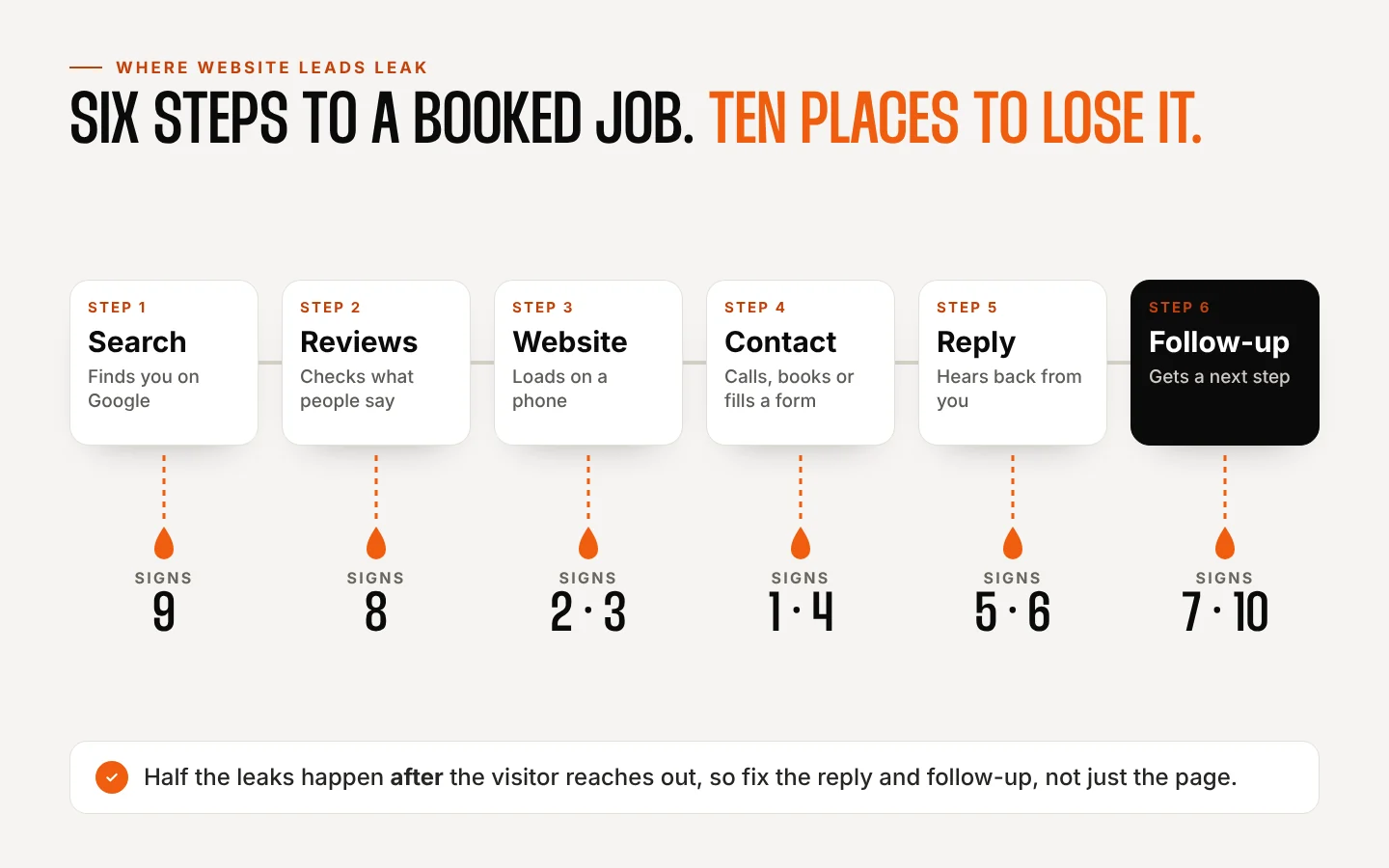
Signs 1–4: problems visitors hit on the page
1. You can’t call or book with one tap on a phone
The phone number is an image, it’s buried in the footer, or tapping it does nothing. On a phone, the main action (call, book, request a quote) should be visible without scrolling and work with one tap. For service businesses this is the single cheapest fix on this list.
Quick test: open your home page on your phone and tap the number in the header. If your dialer doesn’t open with the number filled in, you’re losing calls.
2. The page is slow on a phone
Google’s Core Web Vitals give a clear bar: the main content should load within 2.5 seconds, taps should get a response within 200 milliseconds, and the layout shouldn’t jump around (web.dev). Plenty of sites miss it. In the HTTP Archive’s 2025 Web Almanac, only 48% of mobile websites passed all three Core Web Vitals, and 62% had a good loading score (Web Almanac 2025).
Quick test: run your home page through our free SEO Checker with its mobile and speed check, or Google’s PageSpeed Insights. Oversized photos, sliders and stacks of plugins are the usual suspects.
48%
Share of mobile websites with good Core Web Vitals in July 2025. More than half of sites give phone visitors a slower or jumpier experience than Google recommends.
3. A stranger can’t tell what you do, and where, in five seconds
“Quality you can trust” is not a headline. “Same-day water heater repair in Mesa, Gilbert and Chandler” is. Visitors decide fast whether they’re in the right place. If the top of your home page doesn’t name the service, the area and the next step, people hit the back button and pick the next result.
Quick test: show your home page to someone outside the business for five seconds, then hide it. Ask what you do, where, and what they’d click. If they can’t answer all three, rewrite the headline before you touch anything else.
4. Your form asks too much, or quietly fails
Long forms scare people off. Broken forms are worse, because nobody tells you. We regularly find contact forms that go to an old employee’s address or into a spam folder. Accessibility is part of this too: WebAIM’s 2026 scan of the top one million home pages found that 33.1% of form inputs weren’t properly labeled, which makes them harder to use with a screen reader and often clumsy on a phone (WebAIM Million 2026).
Quick test: submit your own form from your phone. Count the fields. For a first inquiry you usually need name, phone or email, and one line about the job. Everything else can wait for the conversation.
Signs 5–7: what happens after someone reaches out
5. Inquiries wait hours (or days) for a reply
This is the leak most owners underestimate, because the website technically “worked.” When Harvard Business Review researchers sent test web leads to 2,241 U.S. companies, only 37% responded within an hour, 24% took more than 24 hours, and 23% never responded at all. Among companies that did reply within 30 days, the average response time was 42 hours (HBR, 2011, as summarized by SmartCompany).
Quick test: look at your last ten web inquiries and write down when each one got a real reply. If the typical gap is longer than an hour during business hours, fixing that will probably win you more jobs than any design change.
6. Missed calls go nowhere
You’re on a roof, in a procedure or driving between jobs, and the call goes to a voicemail greeting nobody listens to. Many callers never leave a message; they call the next business on the list. A missed-call text-back (“Sorry we missed you, how can we help?”) gives them an easy way to keep the conversation with you instead.
Quick test: call your business after hours and see what a customer experiences. Is there a clear way to book, text or request a callback?
7. Nobody follows up after the first contact
A quote goes out and then… silence. Without reminders, follow-up depends on someone remembering, and busy weeks win. If leads live in an inbox, a notebook and three people’s phones, some of them will slip. This is exactly where a simple CRM (even a small custom CRM built around your steps) pays for itself: every inquiry lands in one pipeline with a next step and a date.
Signs 8–10: trust, search and measurement
8. Your reviews are better than your website
People check reviews, then check you. In BrightLocal’s 2026 Local Consumer Review Survey, 54% of consumers said they visit a business’s website after reading positive reviews, up from 32% when the question was last asked in 2019 (BrightLocal). If they arrive at a dated site with stock photos and no reviews in sight, the trust you earned on Google leaks away.
Fix: show real project photos, a handful of recent reviews near your calls to action, your license or certifications, and the people behind the business. A design that looks current matters more than owners like to admit; it’s one reason we built a free Website Style Guide with 19 styles to compare.
9. One “Services” page is doing the work of ten
If every service you offer is a bullet on a single page, you’re hard to find for any of them and hard to choose once someone lands. Each main service deserves its own page with what’s included, who it’s for, photos, pricing guidance if you can give it, FAQs and a clear next step. For businesses that travel to customers, add real city pages only where you have local work to show. Our local SEO guide for service-area businesses covers how to do that without creating thin, copy-pasted pages.
10. You can’t say where last month’s leads came from
If you don’t know how many calls and forms came from the website, Google Business Profile, ads or referrals, you can’t tell whether anything above is working. At minimum: track form submissions and tap-to-call clicks in analytics, ask “How did you hear about us?” on the form, and log every inquiry with its source in one place.
Which fixes to make first
You don’t have to fix all ten at once. Start where the effort is lowest and the leak is biggest.
| Fix | Signs it addresses | Effort | Why it’s worth it |
|---|---|---|---|
| Tap-to-call and a visible “Book” or “Get a quote” button | 1, 3 | Hours | Removes friction for people ready to act right now |
| Shorter form, tested end to end | 4 | Hours | Stops silent failures and drop-offs |
| Instant auto-reply and missed-call text-back | 5, 6 | Days | Holds the lead while you’re busy |
| Follow-up reminders in a CRM | 7, 10 | Days to weeks | No quote goes quiet without a decision |
| Image compression and speed work | 2 | Days | Better mobile experience and a Core Web Vitals pass |
| Proof, service pages and a refreshed design | 8, 9 | Weeks | Earns trust and ranks for more of what you sell |
Effort is a typical range for a small business site, not a quote. Core Web Vitals targets from web.dev.
Notice that half of the table isn’t about design at all. It’s about what happens in the minutes and days after someone reaches out. That’s why we look at the website and the follow-up as one system.
Fix it or start over?
A redesign is not always the answer, and we’ll say so. If your site is reasonably fast, looks current and runs on a platform you can edit, fixing signs 1, 4, 5, 6 and 10 often does more for leads than a new look. Start over when several of these are true:
- The site fails Core Web Vitals on mobile and the theme or builder makes it hard to fix.
- It looks noticeably older than your competitors’ sites, or older than the prices you charge.
- Adding a service page or changing a phone number requires calling someone.
- You don’t control the domain, hosting or login.
If you’re weighing a rebuild, our guide to what a website costs in 2026 breaks down the ranges and the questions to ask before you sign.
How AdaptExec helps plug the leaks
We design custom websites built for one job: turning visitors into calls, bookings and quote requests. That means mobile-first layouts, fast pages, real proof, and forms that feed a CRM with the lead’s source and a next step, so nothing sits in an inbox. When the leak is in follow-up rather than the site, we can build the missed-call text-back, auto-replies and reminders on their own.
- Websites start around $900, and every quote is custom.
- You own what we build. No required monthly plan and no long-term contract; support is there if you want it.
- See it working first. Our 12 live demo sites (fictional brands, real builds) show booking, text-back and CRM wiring you can click through like a customer.
Website leads FAQ
Why is my website getting traffic but no leads?
Usually because something between the visit and the inquiry is in the way: an unclear headline, a slow mobile page, a phone number you can’t tap, a long or broken form, or no proof that you’re the right choice. Run the 30-minute audit above on your phone and note every moment you hesitate. Those moments are your leaks.
How many leads should a small business website get?
There’s no honest universal number. It depends on your industry, prices, search demand and how much traffic you get. A better question is whether leads are growing month to month and what share of visitors contact you. Track form submissions and tap-to-call clicks so you have your own baseline.
Will a new website fix my lead problem?
Sometimes, but not always. If the leak is slow replies or no follow-up, a new design won’t help much. If the site is slow, dated, hard to edit or not yours, a rebuild may be the right call. Fix the quick wins first and see what changes.
How fast should I respond to a website inquiry?
As fast as you realistically can, ideally within minutes during business hours. In HBR’s audit of 2,241 companies, the average reply among companies that responded was 42 hours, and nearly a quarter never replied. An instant auto-reply plus a call within the hour puts you well ahead of that.
What’s the cheapest fix with the biggest impact?
For most service businesses: a tap-to-call button and a short, tested form at the top of every page on mobile, plus an instant auto-reply to every inquiry. None of those need a new website.
Sources
- HTTP Archive: Web Almanac 2025, Performance chapter (data from July 2025).
- web.dev: Web Vitals, accessed October 2026.
- WebAIM: The WebAIM Million, 2026 report (data from February 2026).
- BrightLocal: Local Consumer Review Survey 2026, published February 2026.
- Harvard Business Review: The Short Life of Online Sales Leads (Oldroyd, McElheran and Elkington, March 2011); figures as reported by SmartCompany, July 2011.