
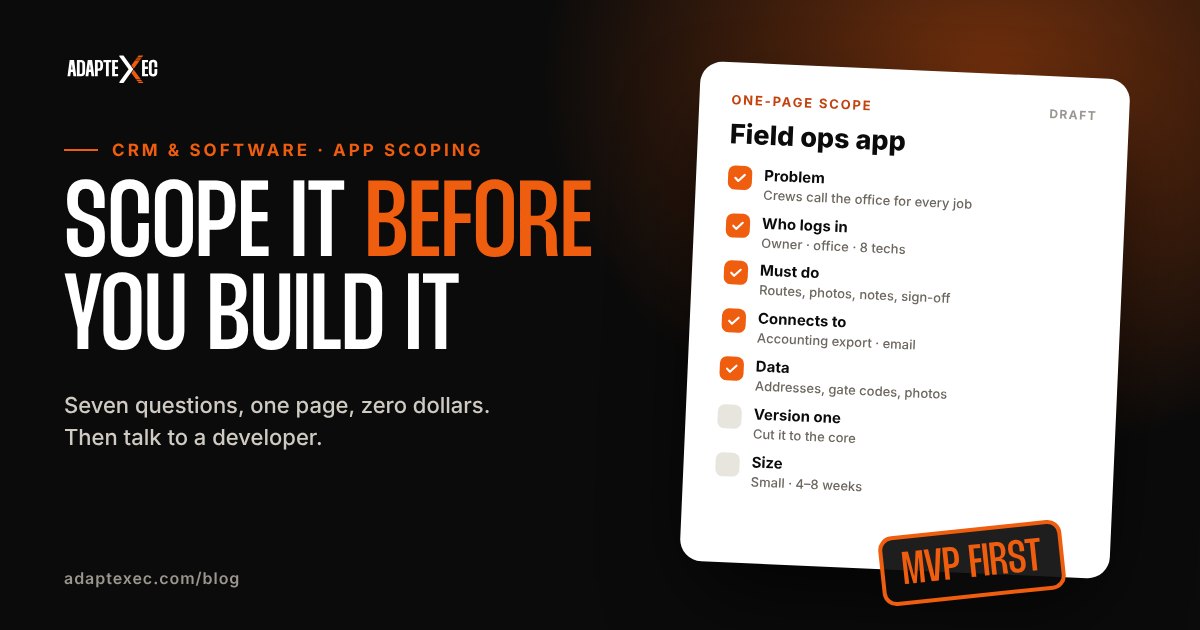
To scope an app idea before you spend a dollar, put six things on one page: the problem, who will log in, what each of them must be able to do, what it connects to, what data it holds, and what has to be in version one. That page is your scope. It takes an afternoon, it costs nothing, and it’s the difference between a focused first release (often in the $2,500 to $15,000 range) and an open-ended project that keeps growing.
This guide is for owners and managers with an idea for a web app, client portal, internal tool or custom CRM who don’t want to hand a developer a blank check. We build these for a living, and the projects that go best almost always start with a clear one-page scope. Here’s how to write yours, with a worked example at the end.
Key takeaways
- Start with the problem, not the app. “We need an app” is a solution. “Our crews call the office 40 times a day for job details” is a problem you can scope.
- Roles drive cost more than features. Every new type of user adds screens, permissions and testing.
- Version one should fit on a sticky note. Sort every feature into “now” and “later,” and be ruthless.
- Test on paper first. Five people clicking through rough sketches will find most of the confusing parts before anyone writes code.
- Use the size to set a budget, then let a discovery call turn it into a real quote.
What it means to scope an app idea
A scope is a short, plain-English description of what you’re building and, just as important, what you’re not building yet. It isn’t a 40-page technical specification. It’s the document that lets you, your team and a developer agree on the same picture before money changes hands.
Government digital teams have a name for this stage. The UK’s Government Digital Service calls it discovery, and its service manual is blunt about the rule: you should not start building your service during discovery (GOV.UK Service Manual). Their discoveries typically run four to eight weeks because they’re serving millions of people. Yours can be an afternoon with a notepad and a week of conversations with the people who’ll use the thing.
A good scope answers seven questions. Our free App Idea Scoper walks through the same seven, so you can write yours in this article or in the tool.
- What problem should this app solve?
- Who will log in, and what kind of user are they?
- What does the app need to do?
- What should it connect to?
- What kind of information will it handle?
- What has to be in version one?
- When do you need it, and what budget feels comfortable?
Step 1: Write the problem, not the solution
Most app ideas arrive as a solution: a mobile app for the crew, a portal for clients, a dashboard for the owner. Before you scope features, rewrite the idea as the problem it fixes. GOV.UK’s example is a good one. “We need to build an interactive map to show people where our contact centres are” becomes “How can we make it easier for people to find their nearest contact centre if they need to book a face-to-face appointment?” The second version leaves room for a better answer, which might not be a map at all.
Try this format:
- Who is struggling: office staff, field techs, clients, partners.
- With what: the specific task that’s slow, error-prone or invisible.
- How you handle it today: spreadsheets, texts, sticky notes, three different apps.
- What it costs you: hours a week, missed jobs, late invoices, unhappy clients. A rough number is fine.
That last line matters. If the problem costs you two hours a month, a $20,000 app is the wrong answer. If it costs a full-time salary or a steady stream of lost jobs, a focused build can pay for itself. GOV.UK recommends the same thing: understand how much the problem is costing before you decide whether to move forward.
Step 2: List everyone who will log in
Roles are the most underrated cost driver in custom software. Every type of user needs its own screens, its own permissions and its own testing. An app with one role (say, your internal team) is a very different project from one with four.
| Role | What they need to do | What they must not see |
|---|---|---|
| Owner / admin | See every job, change settings, run reports | Nothing hidden |
| Office staff | Book jobs, assign crews, send invoices | Payroll and margins |
| Field tech | See today’s jobs, add photos and notes, mark complete | Other techs’ pay, pricing settings |
| Client | Approve quotes, see job status, pay invoices | Other clients, internal notes |
Example roles for a fictional home-services company. Your list will be different, and shorter is cheaper.
Write the “must not see” column even if it feels obvious. It’s where permission bugs and awkward conversations come from later.
Step 3: Describe what the app must do
Skip the feature wish list and write short “jobs” instead, one per line, in the form [role] can [do something] so that [outcome]. For example:
- Office staff can assign a job to a tech so the tech sees it on their phone without a call.
- A tech can upload before-and-after photos so the client and office see proof of work.
- A client can approve a quote online so jobs don’t stall waiting for a signature.
- The owner can see unpaid invoices over 30 days so collections stop slipping.
Ten to twenty lines like these describe most first releases. If you’re past 40, you’re probably describing two or three projects, which is fine, as long as you scope them as phases.
Step 4: Map the connections and the data
Integrations and data are where “simple” apps quietly get expensive. List every system the app has to talk to and which direction the information flows:
- Payments: take card payments through a processor, or just record them?
- Accounting: push invoices into your accounting software, or export a file once a month?
- Calendar, email and SMS: send reminders, confirmations and on-the-way texts?
- Your website: should form submissions land in the app automatically?
- Existing data: are there spreadsheets or an old system to import on day one?
Then describe the information the app will hold. Contact details and job notes are routine. Payment data, health information, financial records or anything about minors raise the bar on hosting, access controls and sometimes legal requirements. Say so up front. It won’t kill the idea, but it changes the plan, and it’s far cheaper to design for it than to bolt it on.
Step 5: Decide what goes in version one
This is the step that saves the most money. A minimum viable product (MVP) is the smallest version of your app that solves the core problem for real users. Take every job from Step 3 and sort it into three columns:
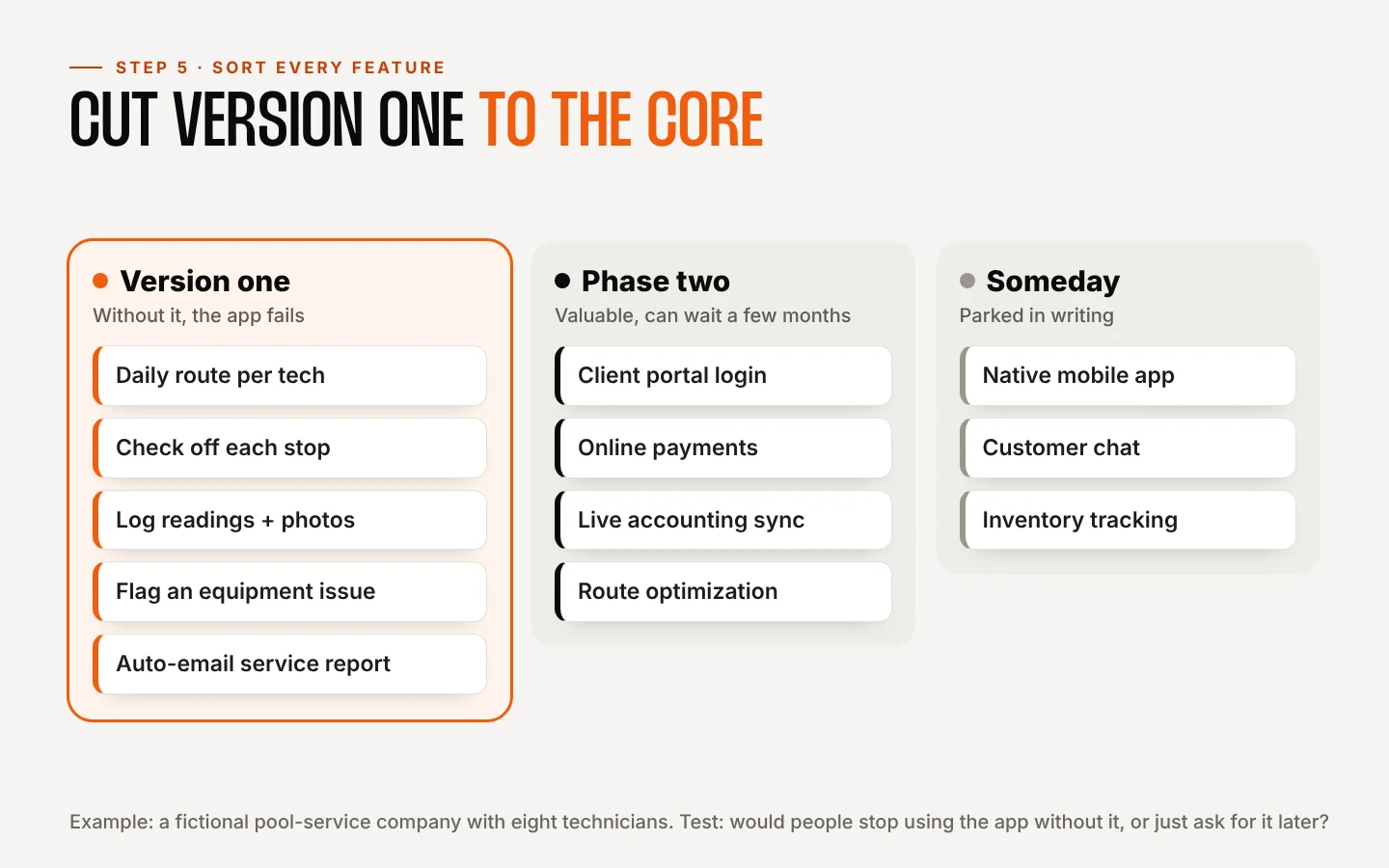
- Version one: without it, the app doesn’t solve the problem. Be strict.
- Phase two: valuable, but people can live without it for a few months.
- Someday: nice ideas. Park them in writing so nobody feels ignored.
A useful test: if version one launched tomorrow without this item, would people stop using the app, or would they just ask for it? Things they’d ask for go in phase two. Real use will reshuffle that list anyway, usually in ways you can’t predict from a whiteboard.
Step 6: Size it and set a budget range
Once you know the roles, jobs, connections and version-one list, you can put the project in a size bracket. These are the illustrative typical ranges our App Idea Scoper uses. They’re not quotes; every real number comes after a discovery conversation.
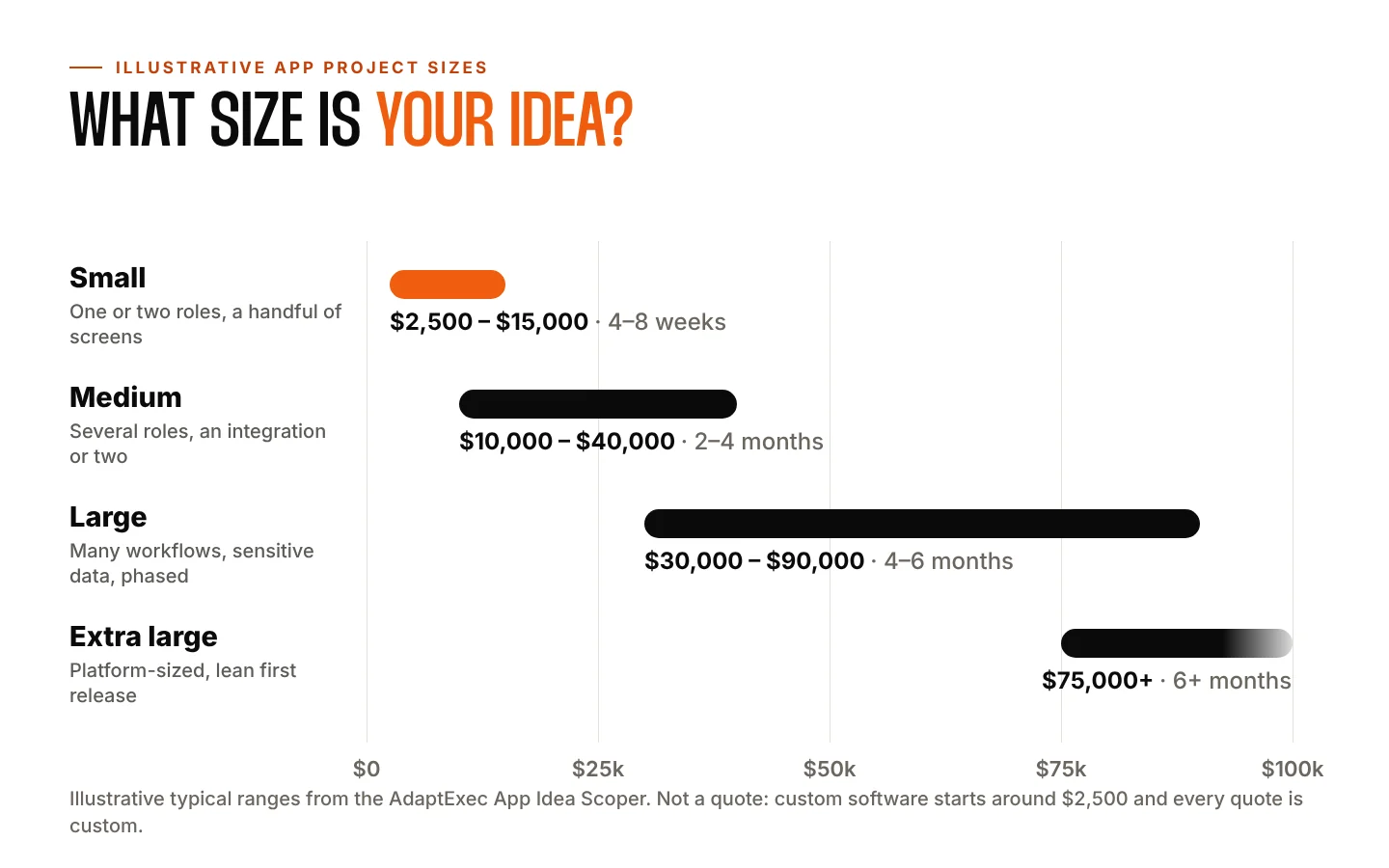
| Size | What it usually looks like | Illustrative range | Typical timeline |
|---|---|---|---|
| Small | One or two user types, a handful of screens. A tight MVP. | $2,500 – $15,000 | 4 – 8 weeks |
| Medium | Several roles and workflows plus an integration or two. Most custom CRMs and portals. | $10,000 – $40,000 | 2 – 4 months |
| Large | Many workflows, several integrations or sensitive data. Usually phased. | $30,000 – $90,000 | 4 – 6 months |
| Extra large | A platform-sized vision. Lean first release plus a roadmap. | $75,000+ | 6+ months, phased |
Illustrative ranges from the AdaptExec App Idea Scoper. Custom software at AdaptExec starts around $2,500 and every quote is custom.
If your idea lands in Large but your budget says Small, that’s not a dead end. It’s a signal to cut version one harder or split the build into phases. Most of the ideas we see can launch something useful in the Small or Medium bracket.
Step 7: Test the idea before anyone writes code
You can test an app that doesn’t exist yet. Sketch the three or four most important screens on paper or in a free design tool, then sit down with the people who’ll use it and ask them to “do” a task: assign this job, approve this quote, find yesterday’s photos. Watch where they hesitate.
You don’t need a big study. Jakob Nielsen’s research at Nielsen Norman Group found that testing with five users uncovers about 85% of the usability problems in a design, and recommends several small rounds of testing over one large one (Nielsen Norman Group). For a small business, that means five staff members or clients and an afternoon. Fix what confused them, then test again.
Five scoping mistakes that blow up budgets
- Copying a big app. “Like Uber, but for pool cleaning” brings years of someone else’s features. Scope your problem, not their product.
- Skipping the boring screens. Logins, password resets, settings, user management and admin views are real work. Count them.
- Assuming integrations are free. Each connection needs mapping, error handling and testing, and some vendors limit what their API allows.
- Forgetting the data you already have. Cleaning and importing five years of spreadsheets can be its own mini-project.
- No owner on your side. Someone on your team needs the authority to make decisions quickly. Projects stall in committees.
A worked example: one page, start to finish
Here’s what a finished scope looks like for a fictional pool-service company with eight technicians. Notice how short it is.
| Question | Answer |
|---|---|
| Problem | Techs call or text the office for every stop. Notes and chemical readings live in a group chat, so nothing is searchable and clients never see proof of service. |
| Who logs in | Owner, two office staff, eight techs. Clients get emailed reports in version one, no login. |
| Must do | Daily route per tech; check off each stop; log readings and photos; flag an equipment issue to the office; auto-email a service report to the client. |
| Connects to | Existing accounting software (export, not live sync, in version one); email. |
| Data | Client names, addresses, gate codes, readings, photos. Gate codes visible only to the assigned tech. |
| Version one | Routes, stop checklist, readings, photos, issue flag, client report email. |
| Phase two | Client portal, online payments, live accounting sync, route optimization. |
| Size and timing | Small. Wants it live before the busy season. |
A fictional example to show the format, not a client project or a quote.
With that page, a developer can give you a meaningful estimate in one conversation, and you can compare quotes on the same scope instead of comparing guesses.
How AdaptExec helps you scope and build
Bring us a finished scope, a rough idea or the output of the App Idea Scoper, and we’ll talk it through on a free discovery call. You’ll get honest advice on what to build first, including when an existing tool is the better answer. When a custom build makes sense, we design and develop web apps, client portals and custom CRMs around how your business actually runs.
Custom software starts around $2,500, and every quote is custom. Once your project is paid in full, you own what we build. There’s no lock-in contract and no required monthly plan; ongoing support is there only if you want it (more on that on Why AdaptExec). If your app needs a new public website in front of it, our website cost guide covers that budget too, and you can browse finished builds in our portfolio.
App scoping FAQ
How long does it take to scope an app idea?
For most small-business apps, a first draft takes an afternoon: an hour on the problem and roles, an hour on features and connections, and an hour cutting version one. Add a few days of conversations with the people who’ll use it and a quick paper test. Large or regulated projects take longer.
What should be in an MVP?
Only what’s needed to solve the core problem for real users. A good test is whether people would stop using the app without a feature, or simply ask for it later. Features they’d ask for belong in phase two.
How much does it cost to build an app for a small business?
It depends on roles, features, integrations and data. As illustrative ranges, a small MVP often lands between $2,500 and $15,000, and a medium build with several roles and integrations between $10,000 and $40,000. At AdaptExec, custom software starts around $2,500 and every quote is custom.
Do I need a technical background to scope an app?
No. A scope describes problems, people, tasks and data in plain English. Your developer’s job is to turn it into a technical plan and tell you where your assumptions don’t hold up.
Should I build a web app or a mobile app?
For most business tools, a responsive web app that works well on phones is the faster and cheaper first step, because one codebase serves every device. Native mobile apps make sense when you need offline use, heavy camera or GPS features, or an app-store presence.