
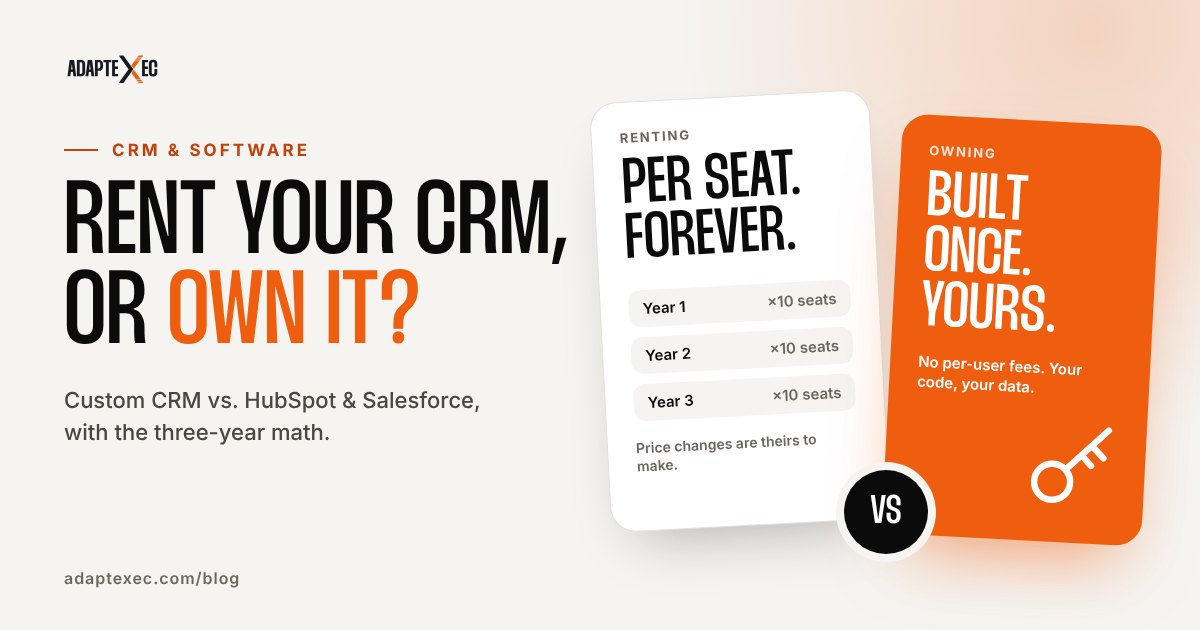
HubSpot and Salesforce are the right choice when your sales process looks like everyone else’s and you need a proven tool running this week. A custom CRM beats renting when your workflow is unusual, when per-seat fees multiply across a growing team, or when the CRM needs to run real operations (jobs, portals, onboarding) that off-the-shelf tools make you work around. The deciding number is usually the three-year cost, not the monthly price.
We build custom CRMs, and we also tell plenty of people they don’t need one. This guide lays out what HubSpot and Salesforce actually cost in 2026, where they shine, where owning your CRM wins, and how to make the call with real numbers instead of a sales pitch from either side.
Key takeaways
- HubSpot Sales Hub Professional starts at $90 per seat per month billed annually, plus a required $1,500 one-time onboarding fee.
- Salesforce’s Pro Suite is $100 per user per month, billed annually. Sales Cloud editions run from $195 to $550 per user per month.
- Renting is usually smarter for small teams with standard pipelines and heavy marketing-automation needs.
- Owning wins when your process is specific, your seat count is growing, or the CRM has to connect deeply to your website and operations.
- Run the three-year math for your own seat count before you decide either way.
The real question: renting vs. owning your CRM
Every CRM decision is really a decision about who owns the system your business runs on. With HubSpot or Salesforce, you rent: you pay per seat, every month or year, for software that’s built for millions of companies. You get a polished product, a huge ecosystem and someone else handling the infrastructure. You also get their roadmap, their pricing changes and their idea of how a sales process should work.
With a custom CRM, you own the system. You pay to build it, then it’s yours. There are no per-user fees, the screens match how your team actually works, and it can do things no off-the-shelf CRM was designed for. The trade-off is an upfront investment and the responsibility for hosting and improving it over time (which you can handle yourself or hand to a developer).
Neither is better in general. One is better for you, and the math usually makes it obvious.
What HubSpot and Salesforce cost in 2026
Here are the published list prices for the plans most small and mid-sized businesses compare. We checked both pricing pages in October 2026. These change often, so confirm before you buy.
| Plan | Published price | Notes |
|---|---|---|
| HubSpot Free | $0 | Free for up to 2 users |
| HubSpot Sales Hub Starter | Starts at $7/seat/mo ($20/seat/mo paid monthly) | Entry-level sales tools |
| HubSpot Sales Hub Professional | Starts at $90/seat/mo billed annually ($100/seat/mo paid monthly on an annual commitment) | Required one-time Professional Onboarding: $1,500 |
| HubSpot Sales Hub Enterprise | Starts at $150/seat/mo | Required one-time Enterprise Onboarding: $3,500 |
| Salesforce Starter Suite | $25/user/mo | Billed monthly or annually |
| Salesforce Pro Suite | $100/user/mo | Billed annually |
| Salesforce Sales Cloud (Core / Advanced / Max) | $195 / $395 / $550 per user/mo | Billed annually |
Sources: HubSpot Sales Hub pricing and Salesforce Sales pricing, accessed October 2026. List prices only; add-ons, credits and taxes are extra.
The headline numbers look small. They stop looking small once you multiply them by your seat count and by 36 months.
Do the math: the three-year cost of renting
Let’s take a ten-person team, which is where a lot of growing service businesses land. Using list prices only:
- HubSpot Sales Hub Professional: 10 seats × $90 × 12 months = $10,800 a year. Add the $1,500 onboarding and that’s $33,900 over three years.
- Salesforce Pro Suite: 10 users × $100 × 12 months = $12,000 a year, or $36,000 over three years.
And that’s before add-ons, extra seats as you hire, or the apps you bolt on to fill gaps. Compare that with a custom build. Our custom CRMs start around $1,500. The illustrative ranges from our CRM Builder are $1,500 to $8,000 for a starter CRM, $6,000 to $25,000 for a growth build with more modules and integrations, and $20,000 to $60,000+ for advanced systems, usually built in phases.
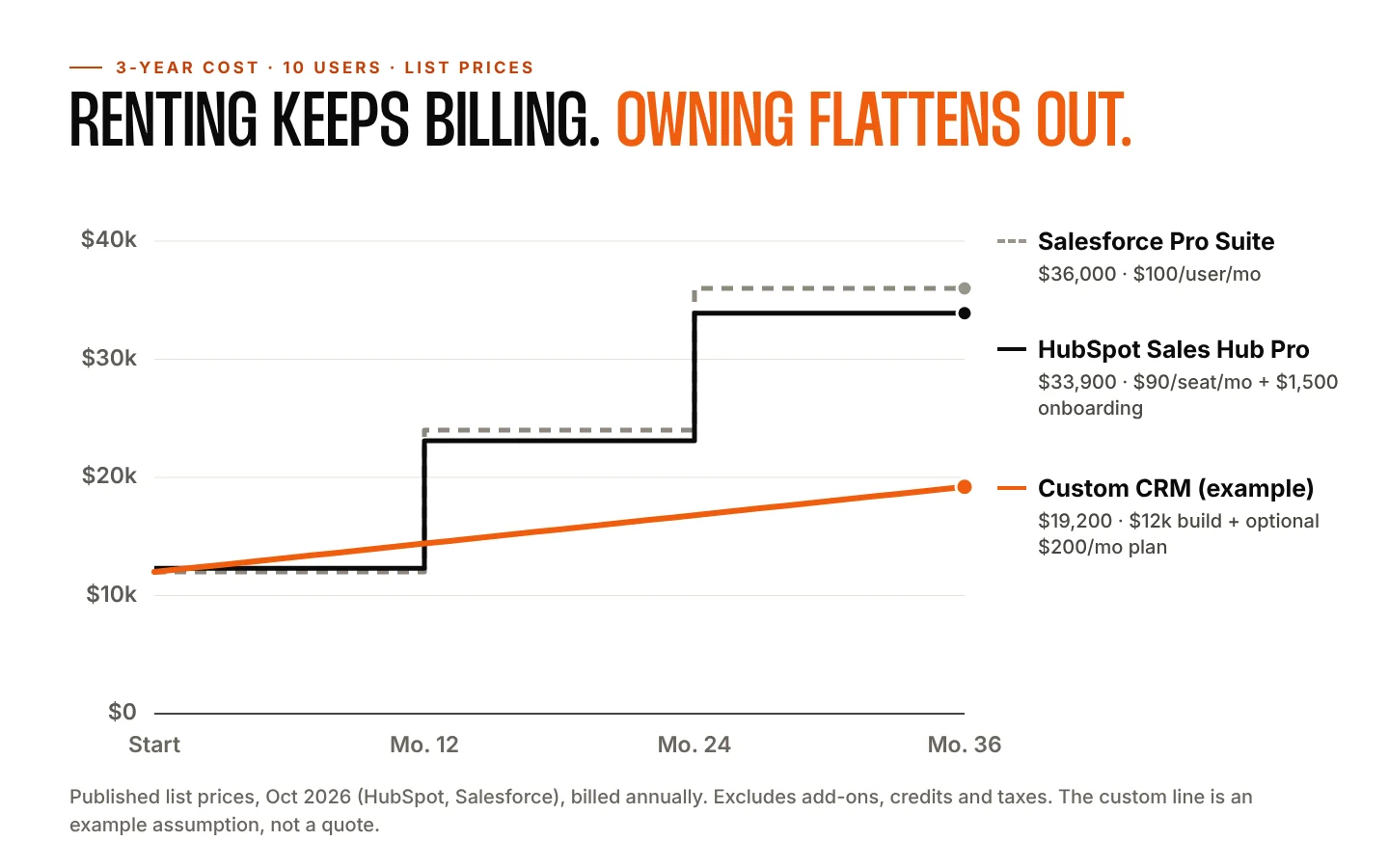
Be honest about the other side too. A large custom build plus ongoing development can cost as much as renting, or more. Custom isn’t automatically cheaper. It’s cheaper when the build matches what you actually need and the seat math is working against you. That’s why we always show both numbers side by side.
When HubSpot or Salesforce is the better choice
We’d rather lose a project than build something you don’t need. Renting is usually the smarter move if:
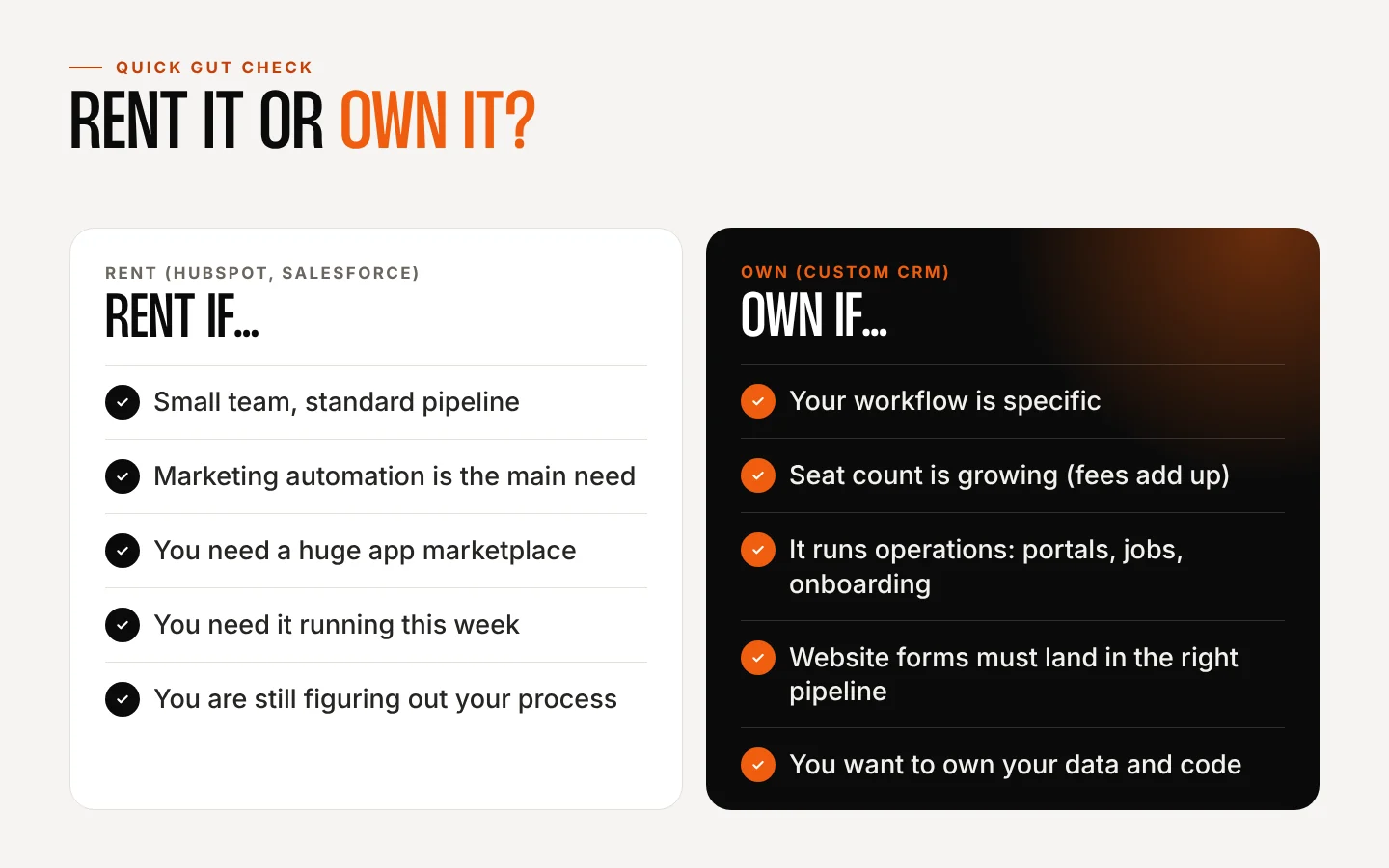
- You’re a very small team with a standard pipeline. HubSpot’s free plan covers up to two users, and the Starter tier is inexpensive. For a two-person shop tracking deals, that’s hard to beat.
- Marketing automation is the main event. If email nurturing, ads, landing pages and attribution are your core needs, these platforms have years of features you’d be rebuilding.
- You need a huge integration marketplace. Both ecosystems connect to thousands of tools out of the box.
- You need it running next week. Signing up takes minutes. Even a lean custom build takes weeks.
- Your process genuinely fits the standard model. Lead, deal, close, repeat. If that’s you, the off-the-shelf design was made for you.
When a custom CRM wins
The pattern we see over and over: a business outgrows the “standard” model and starts paying for software that its team works around instead of with. A custom CRM makes sense when:
- Your workflow is specific. Jobs, inspections, approvals, case files, agent hierarchies, intake checklists. If your team keeps a spreadsheet next to the CRM, that’s a sign.
- Your seat count is growing. Per-seat pricing punishes growth. Owning your CRM means adding a user costs nothing extra.
- The CRM needs to run operations, not just sales. Client portals, scheduling, onboarding workflows, proposals and contracts, reporting built around your numbers.
- Your website and CRM should be one system. Forms that land in the right pipeline, tagged by source, with the follow-up already scheduled.
- You want to own your data and your tools. No surprise price changes, no features removed from your plan, no vendor deciding your roadmap.
A real example: we built the custom CRM tools behind The Miliare Group and Virtuity, two financial firms that share one network of agents. Thousands of financial agents use those tools every day for pipelines, client management and onboarding, shaped around how they actually prospect and serve families. A generic CRM would have forced every one of those agents into someone else’s process.
Lock-in: what you can and can’t take with you
“You can always export your data” is true, but it’s not the whole story. HubSpot’s own documentation lists what you can export: CRM records like contacts, companies and deals, plus property history, files and more. It also notes the limits. Workflows export only as a spreadsheet or a PNG image, without performance data or history, and HubSpot recommends you plan to rebuild them in a new system (HubSpot Knowledge Base).
That’s fair, and it’s normal for any platform. But it means the real switching cost isn’t your contact list. It’s every automation, report and process your team built inside the tool. With a custom CRM you own the application and the database, so there’s nothing to rebuild if you change vendors. Your code and data stay with you. One detail worth asking any developer: who owns the code once it’s paid for? Ours is simple. Once your project is paid in full, the custom application we built for you is yours.
You don’t have to go all-or-nothing
Plenty of businesses land somewhere in the middle:
- Start rented, plan to own. Use a free or starter plan while you learn what your process really needs, then build exactly that.
- Keep the marketing tool, own the operations. Leave email marketing where it is and build a custom system for jobs, clients and follow-up.
- Connect what you already use. A custom CRM can connect with email, SMS, calendars, payment processors, accounting software, and most platforms that offer an API.
- Build in phases. Launch the core pipeline first, then add portals, automations and reporting as you grow.
How to decide in about 30 minutes
Start with the quick gut check below, then do the math for your own business.
- Map your real pipeline. Write down every stage a lead or job goes through, including the ones that live in spreadsheets and text messages today.
- Count your seats, now and in two years. Who needs a login? Field techs, assistants, agents, partners?
- List your must-have automations. Follow-up reminders, review requests, proposals, onboarding steps.
- List the tools it must connect to. Website forms, phone, calendar, accounting, payments.
- Price three years of renting at your seat count, including onboarding and add-ons.
- Get a custom estimate for the same scope, and compare the two totals side by side.
One more number worth knowing before you decide: how many leads you’re losing right now. Research published in Harvard Business Review found that “most companies are not responding nearly fast enough” to online leads (HBR). Whatever CRM you choose, its first job is making sure every lead gets a fast reply. Our Lead Leak Calculator estimates what missed calls, slow replies and no follow-up are costing you.
What building a custom CRM with AdaptExec looks like
Our process is the same whether you need a lightweight internal tool or a large platform:
- Discovery and strategy. We learn how your business operates and find the pain points, inefficiencies and opportunities for automation.
- System architecture and planning. We map workflows, roles, dashboards, permissions, integrations and data migration before any development begins.
- Custom development. Built specifically for your requirements, not adapted from a generic template.
- Testing and optimization. Usability, responsiveness, speed, security and workflow testing.
- Launch and support. We keep improving the system as your business evolves, if you want us to.
There are no per-user fees and no lock-in contracts. If you want ongoing support, hosting or new features over time, we can set up a plan, but it’s optional, never required. You can see more about how we work on our custom CRM and web apps page and why we built the business this way on Why AdaptExec. And if you’re also planning a new website to feed that CRM, our website cost guide breaks down what to budget.
Custom CRM vs. HubSpot FAQ
Is a custom CRM more expensive than HubSpot?
Upfront, yes: there’s a build cost, and ours start around $1,500. Over three years it depends on your seat count and scope. For a ten-person team on HubSpot Sales Hub Professional, list prices add up to about $33,900 over three years. A focused custom build often comes in well under that, while a large custom platform may not. Compare both totals for your own numbers.
How long does it take to build a custom CRM?
It depends on scope. A focused internal tool can launch in a matter of weeks. Larger platforms are planned and released in phases, so your team starts getting value sooner.
Can you move our data from HubSpot or Salesforce?
In most cases, yes. We plan data migration during the architecture phase so contacts, deals, notes and history come with you. Automations and workflows are rebuilt to match how you actually want them to run.
Who maintains a custom CRM after launch?
You do, in the sense that you own it. You can keep us on an optional support plan, bring it in-house, or hire any qualified developer. We retain rights only to our reusable frameworks and tools, which you receive a license to use as part of your system.
Is HubSpot’s free CRM really free?
HubSpot’s pricing page lists its free tools as free for up to 2 users, with no credit card required. Paid features, more seats and higher tiers cost extra, and the Professional and Enterprise tiers carry required one-time onboarding fees.
Sources
- HubSpot Sales Hub pricing, accessed October 2026.
- Salesforce Sales pricing, accessed October 2026.
- HubSpot Knowledge Base: Export your content and data
- Harvard Business Review: The Short Life of Online Sales Leads
![Museum-style exhibit of near-identical bad SEO blog posts titled Home Builder [Town], labeled Exhibit A: 4,149 blog posts](https://adaptexec.com/wp-content/uploads/2026/10/bad-seo-blog-posts-exhibit-a-museum-1024x538.jpg)