
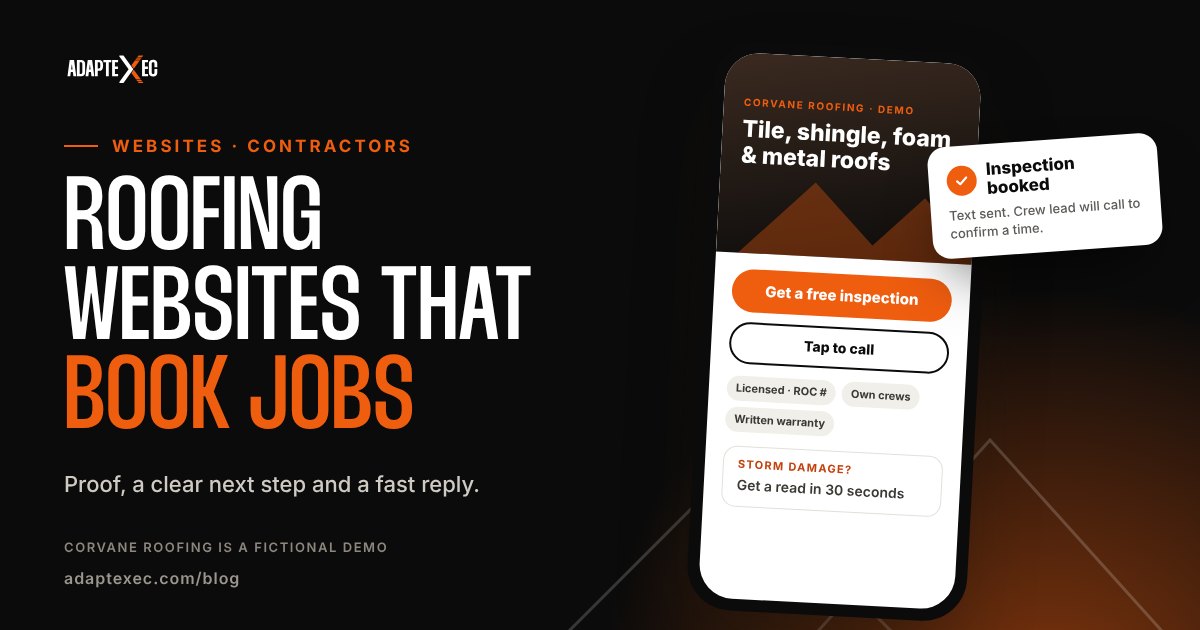
A roofing contractor website books jobs when it does four things on a phone, fast: proves you’re licensed and real (license number, real job photos, a warranty explained in plain words), makes the next step obvious (tap-to-call and a short inspection request), answers the questions homeowners ask before they call (process, materials, storm damage, financing), and gets every lead to a person quickly. Looks matter less than most contractors think. Trust and speed matter more.
This guide is for roofing, plumbing, HVAC and other home-service contractors, written from the Phoenix Valley but useful anywhere. We build contractor websites and the CRMs behind them, and we built two working demos to show what this looks like in practice: Corvane Roofing and Copperwren Plumbing. Both are fictional companies, and we’ll reference them throughout so you can click through each idea.
Key takeaways
- Homeowners are told to check your license. Arizona’s Registrar of Contractors tells them to verify it before hiring, so make that easy.
- Real photos and plain-English warranties do more to win the job than stock images and slogans.
- One primary action per screen: “Book a free inspection” or “Call now,” never five competing buttons.
- Reviews must be real. The FTC’s rule bans fake reviews and incentives tied to positive ones.
- The website is half the system. The other half is how fast someone responds after the form is sent.
What homeowners check before they call
A roof is one of the biggest repair bills a homeowner faces, and most have heard a story about a storm chaser who took a deposit and disappeared. So they look for reasons to trust you, and reasons not to.
The first one is your license. The Arizona Registrar of Contractors (ROC) tells homeowners to “check the license” no matter how they found a contractor, whether through a door-knocker, a Facebook ad or a friend, and to make sure it’s current on the day they sign. It notes that a license is generally required when a project’s total cost, including labor and materials, is over $1,000 or when a permit is required, and it recommends getting estimates from at least three licensed contractors (Arizona Registrar of Contractors).
Translate that into your website: if homeowners are going to compare you against two other licensed roofers, your site should make the comparison easy and make you look like the safe choice.
- License number in the header or footer, linked to the state’s contractor search so they can verify it in one tap.
- Real photos of real jobs, with the city and roof type, not stock images of a stranger’s roof.
- Who does the work. Your own crews or subcontractors? Name the crew lead if you can.
- A warranty explained plainly. What your workmanship warranty covers, what the manufacturer covers, and what neither covers.
- Recent, genuine reviews from Google and other platforms.
The first screen: what has to be there
Most roofing leads come from phones, often right after a storm or when there’s a stain on the ceiling. The first screen has seconds to say who you are and what to do next.
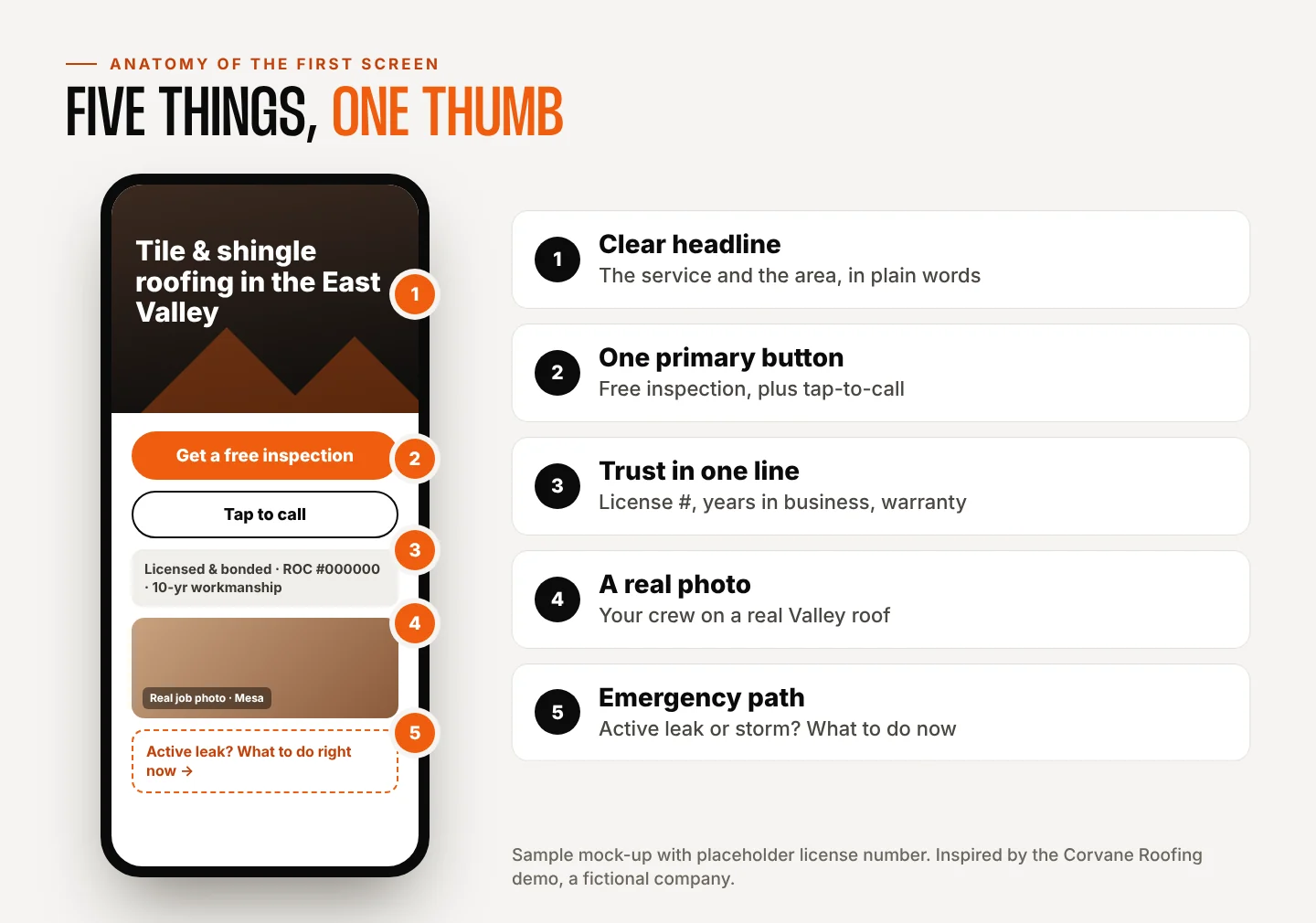
- A clear headline that names the service and the area: tile, shingle, foam and metal roofing in the East Valley, for example.
- One primary button (“Get a free inspection”) and a visible tap-to-call number.
- Three trust signals in one line: licensed and bonded with your number, years in business, warranty length.
- A real photo, ideally your crew on a Valley roof.
- A secondary path for emergencies: active leak or storm damage, with a short what-to-do-now note.
Our Corvane Roofing demo leads with the conditions every Arizona roof faces (heat, hail, haboob dust and monsoon wind) and puts the free estimate and storm-damage checker side by side. It’s a fictional company, but the structure is what we’d recommend for a real one.
The pages a roofing contractor website needs
| Page | Why it matters | What to include |
|---|---|---|
| Service pages by roof type | Homeowners search by problem and material | Tile re-lay, shingle replacement, foam and flat roofs, metal. Real jobs and FAQs on each. |
| Storm and leak repair | Urgent, high-intent visits | What to do right now, what you’ll inspect, how you document damage |
| Process | Reduces fear of the unknown | Inspection, written quote, scheduling, build days, walkthrough |
| Warranty | A major comparison point | Workmanship vs. manufacturer coverage, in plain words |
| Project gallery | Proof | Before-and-after sets with city, roof type and scope |
| Service area | Local search and clarity | Cities you serve, with real local projects for each |
| Financing | Removes the price objection | Options you actually offer, with the lender’s terms linked |
| About and license | Trust | Owner, crews, license number and lookup link |
The Corvane demo shows a few of these as interactive pieces: a layer-by-layer view of what goes on the roof, a side-by-side comparison of tile, shingle, foam and metal for desert conditions, a warranty explainer and a before-and-after slider. You don’t need every interactive element. You do need the information behind them.
Forms that book jobs instead of collecting emails
A long contact form with twelve fields loses people. A form that asks only what you need to schedule, in a few taps, books jobs. The pattern that works:
- Start with the problem. Leak, storm damage, replacement quote, maintenance. Tappable buttons, not a dropdown.
- Ask how urgent it is. Emergencies should route differently from “just getting a quote.”
- Check the ZIP code early. If you don’t serve it, say so kindly before they type everything else.
- Collect contact details last, with a best time to reach them.
- Confirm what happens next on the thank-you screen: who will call, and roughly when.
Our Copperwren Plumbing demo uses exactly that four-step flow (problem, urgency, ZIP, contact) and shows a sample on-the-way tracker afterward. Corvane adds a storm-damage checker that asks when the storm hit, what kind of roof you have and what you’ve noticed, then gives a plain-English read, including when you probably don’t need a roofer. That honesty builds more trust than any badge.
Reviews and testimonials, done right
Reviews are one of the first things homeowners check, which is exactly why the rules matter. In August 2024 the Federal Trade Commission announced a final rule that bans fake reviews and testimonials, including AI-generated ones and reviews from people with no real experience with the business. It also prohibits offering incentives conditioned on a review being positive (or negative), and bans suppressing negative reviews with threats or intimidation (Federal Trade Commission).
What that means in practice:
- Ask every customer, not just the happy ones, and make it easy with a direct link by text after the walkthrough.
- Don’t offer discounts or gifts in exchange for five stars. If you thank people for reviewing, it can’t depend on what they say.
- Reply to every review, especially the critical ones. A calm, specific reply often persuades more than the review itself.
- Show real reviews on your site with a link to the source, and never edit them to sound better.
After the form: speed wins the job
Homeowners with a leak usually contact more than one roofer. The first one to respond with a real answer has a big advantage. That’s not a website problem, but a website can make it much easier to solve.
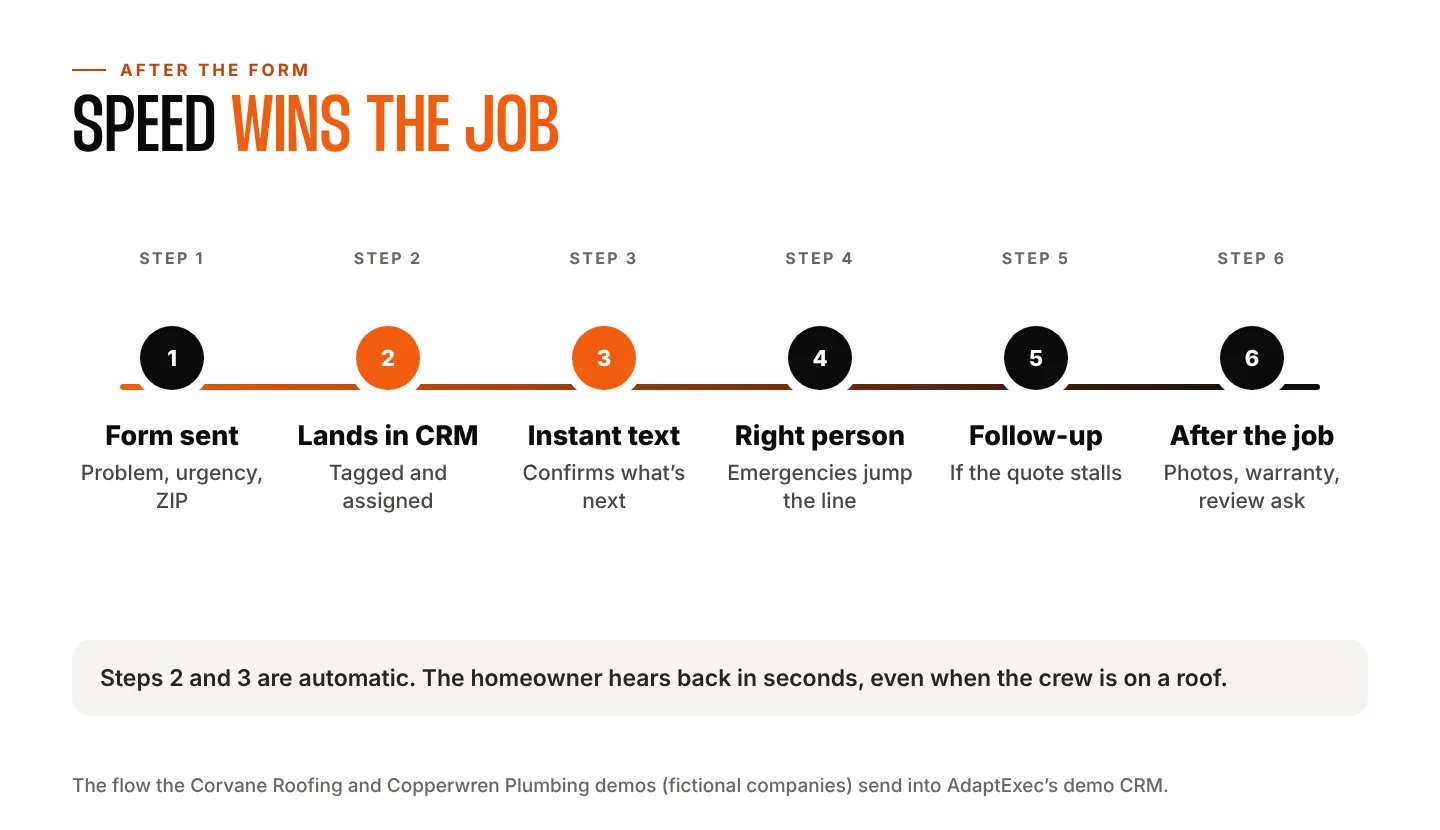
- The form lands in a CRM, not an inbox, tagged by problem, urgency and ZIP.
- The homeowner gets an instant text confirming the request and when to expect a call.
- The right person is notified, with emergencies jumping the line.
- Follow-up is automatic if the quote isn’t accepted: a reminder in a few days, then a check-in before the season changes.
- After the job, the CRM sends the photo report, warranty details and a review request.
Both demos send their sample forms into AdaptExec’s demo CRM so you can see that flow end to end. For a real contractor, a custom CRM can run jobs, crews, photos, quotes and invoices in one place. Not sure how many leads you’re losing between the form and the callback? That’s what our Lead Leak Calculator estimates.
Getting found: Google Business Profile and local pages
Most roofing searches are local: “roof repair Gilbert,” “tile roof replacement Mesa,” “roofer near me.” Your website and your Google Business Profile work together. Google’s guidelines say your business name should match your real-world name as used on your signage, website and stationery, and that a business that serves customers at their location can set a service area instead of showing an address, as long as it follows the rules for its business type (Google Business Profile guidelines). Stuffing keywords into your business name breaks those guidelines.
On the website, build service pages first, then city pages only where you have real local jobs to show. We cover the whole approach in our local SEO guide for service-area businesses.
Common contractor website mistakes
- Stock photos everywhere. Homeowners can tell, and it undercuts every claim you make.
- No license number, or one buried on a page nobody visits.
- Phone number as an image, so it can’t be tapped on a phone.
- “Contact us” as the only call to action, with no idea what happens next.
- Forms that go to an unmonitored inbox. The most expensive mistake on this list.
- Promises you can’t put in writing. If the warranty page and the contract disagree, the homeowner will notice.
How AdaptExec builds contractor websites
We design custom contractor websites built around booking, not brochures, and connect them to a CRM when that helps you respond faster. Click through the Corvane Roofing demo and the Copperwren Plumbing demo to try the flows yourself. Both are fictional companies, and the forms go only to our demo CRM, so nobody will call you.
Websites start around $900 and custom CRMs around $1,500, and every quote is custom. You own what we build once it’s paid for, with no long-term contract and no required monthly plan. For a fuller budget picture, see our website cost guide.
Roofing contractor website FAQ
What should a roofing contractor website include?
Your license number with a lookup link, real job photos, service pages by roof type, a storm and leak repair page, your process, a plain-English warranty page, genuine reviews, a service area, and a short inspection request form with tap-to-call on every page.
Should I show my contractor license number on my website?
Yes. Arizona’s Registrar of Contractors tells homeowners to verify a contractor’s license before hiring. Showing your number and linking to the state lookup saves them a step and signals you have nothing to hide.
How do I get more roofing leads from my website?
Make the next step obvious on a phone, ask only what you need to schedule, answer common questions on the page, show real proof, and respond fast. Many contractors lose more leads after the form is sent than before it.
Can I offer customers a discount for leaving a review?
Not if the incentive depends on the review being positive. The FTC’s 2024 rule prohibits incentives conditioned on a review’s sentiment. Ask every customer for honest feedback and make it easy to leave.
How much does a roofing website cost?
It depends on pages, features and integrations like booking and a CRM. At AdaptExec, websites start around $900 and custom CRMs around $1,500, with every quote custom. Our website cost guide shows typical ranges by project size.