
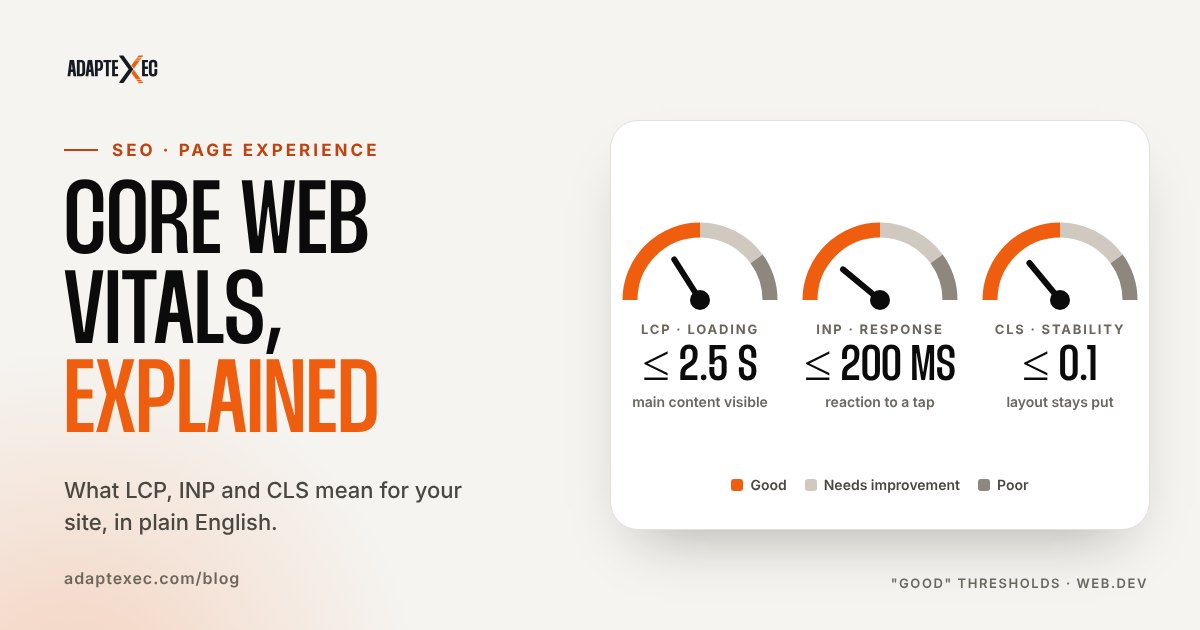
Core Web Vitals are three measurements Google uses to judge how a web page feels to real visitors: how fast the main content loads (LCP, good at 2.5 seconds or less), how quickly the page responds when someone taps or clicks (INP, good at 200 milliseconds or less), and how much the layout jumps around while loading (CLS, good at 0.1 or less). Google measures them from real Chrome users, and a page passes when 75% of visits meet all three. They count toward search rankings, but relevant content still matters more.
That’s Core Web Vitals explained in one paragraph. The rest of this guide is for business owners who want to know what the numbers mean, how to check their own site in five minutes, how much it matters for Google, and what to ask a developer to fix. No coding required.
Key takeaways
- Three metrics: loading (LCP), responsiveness (INP) and visual stability (CLS).
- Real visitors, not lab tests, decide your status in Google, measured at the 75th percentile, separately for mobile and desktop.
- Most sites struggle on phones. In July 2025 data, 48% of mobile websites had good Core Web Vitals.
- They help rankings at the margins. Google says it shows the most relevant content even when page experience is weak.
- The usual culprits are fixable: oversized images, heavy plugins and scripts, and elements without reserved space.
The three Core Web Vitals in plain English
LCP: Largest Contentful Paint (loading)
How long until the biggest thing in view (usually the hero image or headline) appears. It’s the moment a visitor feels the page has “loaded.” Google’s target is 2.5 seconds or less; over 4 seconds is poor (web.dev: LCP).
INP: Interaction to Next Paint (responsiveness)
How long the page takes to visibly react when someone taps a button, opens a menu or types in a form, measured across the whole visit. Good is 200 milliseconds or less; above 500 ms is poor (web.dev: INP). INP replaced the older First Input Delay (FID) metric as a Core Web Vital on March 12, 2024 (web.dev), so older articles that mention FID are out of date.
CLS: Cumulative Layout Shift (visual stability)
How much content unexpectedly moves while someone is looking at it. You’ve felt bad CLS when you go to tap a link and an ad or image loads above it, pushing everything down. Good is 0.1 or less; above 0.25 is poor (web.dev: CLS). CLS is a score, not a time.
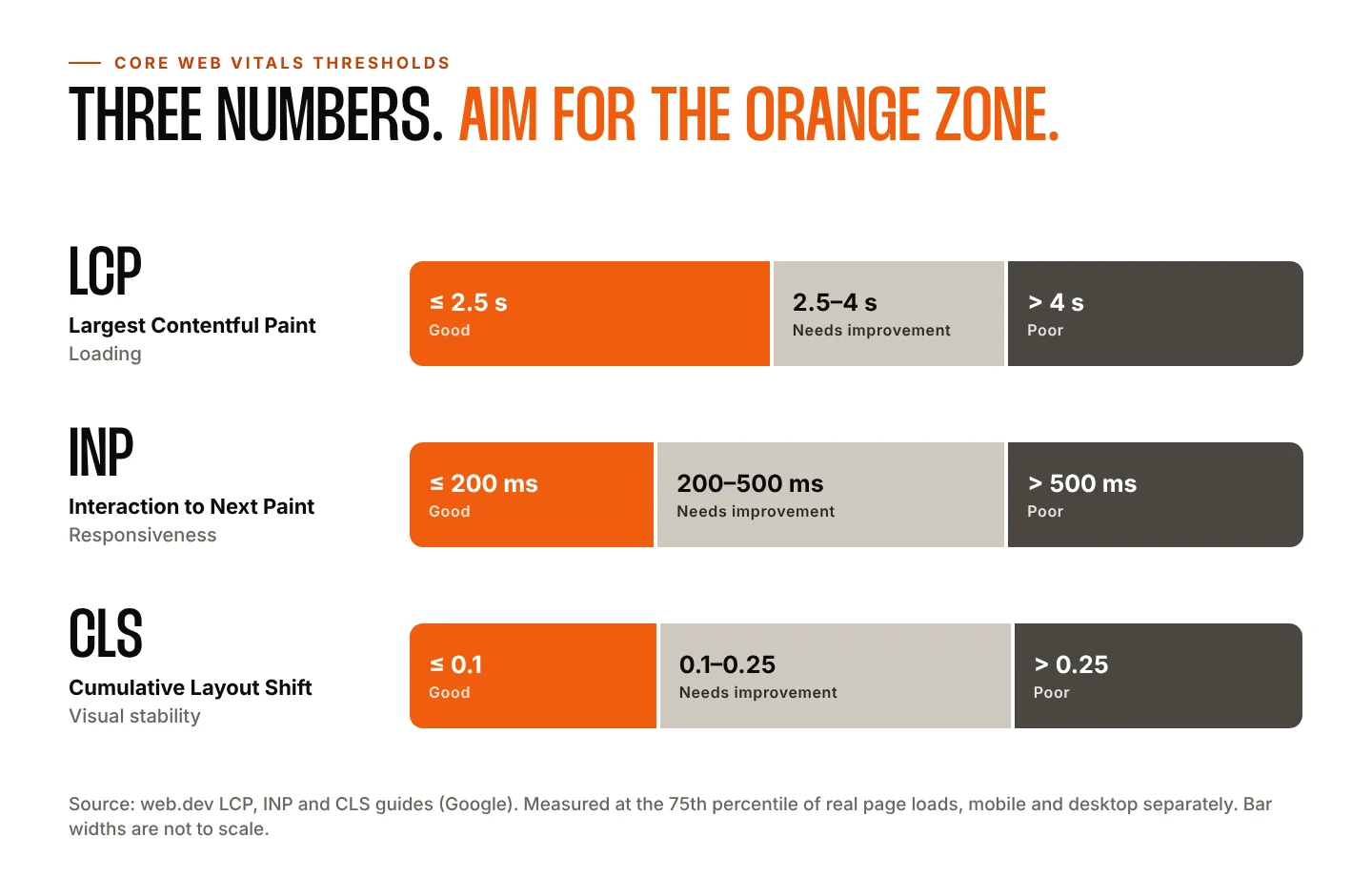
| Metric | What it measures | Good | Needs improvement | Poor |
|---|---|---|---|---|
| LCP | Loading of main content | ≤ 2.5 s | 2.5–4.0 s | > 4.0 s |
| INP | Response to taps, clicks, typing | ≤ 200 ms | 200–500 ms | > 500 ms |
| CLS | Unexpected layout movement | ≤ 0.1 | 0.1–0.25 | > 0.25 |
Thresholds from web.dev’s LCP, INP and CLS guides, measured at the 75th percentile of page loads.
How Google measures them (and why your score jumps around)
Two ideas explain most of the confusion owners have with Core Web Vitals.
Field data vs. lab data
Field data comes from real Chrome users visiting your site, collected in the Chrome User Experience Report (CrUX). This is what Google Search uses. Lab data is a simulated test on one device, like the Lighthouse score in PageSpeed Insights. Lab tests are great for diagnosing problems, but they can’t measure INP directly because nobody is tapping anything, so they use Total Blocking Time as a stand-in (web.dev: Web Vitals).
That’s why your Lighthouse “performance score” can change every time you run it while your Core Web Vitals status stays the same. The score is a lab estimate. The pass or fail comes from real visits over the previous 28 days (PageSpeed Insights docs).
The 75th percentile
Google looks at the experience of your visitors at the 75th percentile, segmented by mobile and desktop. In plain terms: at least three out of four visits need to be “good” for the page to pass. Your own fast office Wi-Fi isn’t the test; a customer on an older phone in a parking lot is.
How to check your Core Web Vitals in five minutes
- Run PageSpeed Insights on your home page and your most important service page. Look at the real-user (field data) section at the top and note whether it says Passed or Failed for mobile.
- Open Search Console and go to the Core Web Vitals report. It groups your URLs into good, needs improvement and poor, for mobile and desktop.
- Note which metric fails and on which page types. Problems usually come from a template, so one fix often helps dozens of pages.
- Check on your own phone over cellular data. Does the hero image pop in late? Does the menu lag? Does anything jump?
Do Core Web Vitals affect Google rankings?
Yes, but they’re not a magic lever. Google’s documentation says plainly that “Core Web Vitals are used by our ranking systems,” and recommends site owners achieve good scores “for success with Search” (Google Search Central). The same documentation also says Google “always seeks to show the most relevant content, even if the page experience is sub-par” (Google Search Central).
Our read: when you and a competitor are similarly relevant for “water heater repair Mesa,” a faster, steadier site can help tip it. A fast site with thin content won’t beat a slower one with genuinely better answers. And beyond Google, speed affects people directly: slow, jumpy pages lose visitors before they ever call. We cover that side in 10 signs your website is quietly costing you leads.
How most websites actually score
If your site fails, you’re in large company. The HTTP Archive’s 2025 Web Almanac, based on real-user data from July 2025, found:
- 48% of mobile websites and 56% of desktop websites had good Core Web Vitals overall.
- On phones, 62% had good LCP, 77% had good INP and 81% had good CLS.
(Web Almanac 2025: Performance)
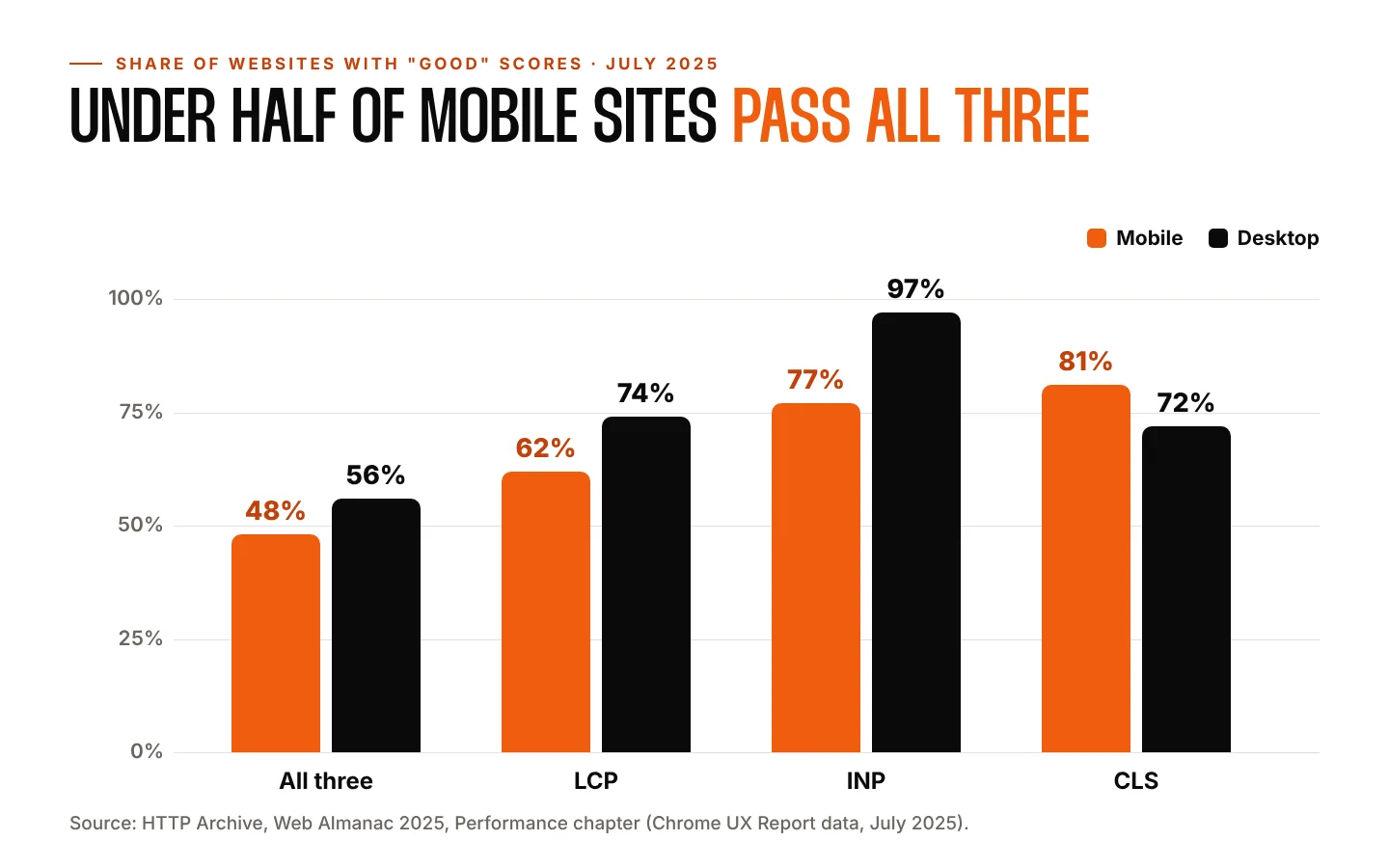
Loading is the hardest metric for most sites, and phones are where sites fail. That’s where to focus first.
What usually breaks each metric, and how to fix it
You don’t need to know how to code to have a productive conversation with your developer. Here’s what we find most often on small business sites, especially WordPress sites built with page builders.
| Metric | Common cause | Typical fix |
|---|---|---|
| LCP | Huge hero image or background video | Resize and compress to WebP or AVIF; serve the right size per device; load the hero first |
| LCP | Slow hosting or no caching | Better hosting, page caching and a CDN |
| LCP | Sliders, animations and render-blocking scripts above the fold | Replace sliders with one strong image; defer non-essential scripts |
| INP | Too many plugins, chat widgets and tracking scripts | Remove what you don’t use; delay third-party scripts until interaction |
| INP | Heavy menus, filters or forms built with lots of JavaScript | Simplify the component or have a developer break up long tasks |
| CLS | Images and embeds without set dimensions | Add width and height so space is reserved |
| CLS | Cookie banners, promo bars or ads injected above content | Reserve their space or overlay them instead of pushing content |
| CLS | Web fonts swapping in at a different size | Preload key fonts and match fallback font sizing |
CLS causes summarized from web.dev; other fixes reflect common practice. Every site is different, so test before and after.
Questions to ask your developer or agency
- Do our pages pass Core Web Vitals on mobile in field data? Ask for the PageSpeed Insights or Search Console screenshot, not just a Lighthouse score.
- Which metric fails, on which templates, and why?
- What’s the plan, and what will each fix cost? Some fixes take an hour; some need a rebuild of a template.
- Which plugins and third-party scripts can we remove?
- How will we confirm it worked? Field data updates over a rolling 28 days, so expect a few weeks before Search Console reflects changes.
Planning a new site? Put Core Web Vitals in the requirements from day one. It’s much cheaper to build fast than to make a slow site fast later. Our website planning checklist covers what else to prepare before you hire a designer.
How AdaptExec handles Core Web Vitals
Every website we build is designed mobile-first and tested against Core Web Vitals on real phones before launch: compressed modern image formats, reserved space for images, lean templates and as few third-party scripts as possible. For existing sites, our SEO services include a speed and Core Web Vitals review with a prioritized fix list. We’ll tell you when a few targeted fixes will do, and when a template rebuild is the better spend. You can see the kind of sites we build in our portfolio, and every free checker and planner we offer is on the free tools page.
- Websites start around $900; every quote is custom.
- You own what we build. No required monthly plan and no long-term contract.
- No ranking promises. Nobody can honestly guarantee positions. We can make the site fast, clear and technically sound.
Core Web Vitals explained: FAQ
What are the three Core Web Vitals?
Largest Contentful Paint (LCP) for loading, Interaction to Next Paint (INP) for responsiveness, and Cumulative Layout Shift (CLS) for visual stability. Good scores are LCP of 2.5 seconds or less, INP of 200 milliseconds or less, and CLS of 0.1 or less.
What replaced First Input Delay (FID)?
Interaction to Next Paint (INP) replaced FID as a Core Web Vital on March 12, 2024. INP measures responsiveness across the whole visit, not just the first interaction.
Why is my PageSpeed score different every time I test?
The performance score is a lab test run on a simulated device, and it varies with network and server conditions. Your Core Web Vitals pass or fail comes from real-user field data over the previous 28 days, which is much steadier.
How long does it take for Core Web Vitals improvements to show up?
Lab scores change immediately. Field data in PageSpeed Insights and Search Console is a rolling 28-day window, so expect several weeks before improvements fully show.
Will passing Core Web Vitals get me to the top of Google?
Not by itself. Core Web Vitals are one of many signals, and Google says relevant content comes first. Passing them removes a disadvantage and gives visitors a better experience, which helps conversions as much as rankings.
Sources
- web.dev: Web Vitals, plus the LCP, INP and CLS guides, accessed October 2026.
- web.dev: Interaction to Next Paint is officially a Core Web Vital (March 12, 2024).
- Google Search Central: Understanding Core Web Vitals and Google search results and Understanding page experience, accessed October 2026.
- HTTP Archive: Web Almanac 2025, Performance chapter (data from July 2025).
- Google: About PageSpeed Insights, accessed October 2026.