
You can redesign your website without losing Google rankings if you protect three things: your URLs (keep them, or 301-redirect every old one to its closest new page), the content that already ranks (don’t cut it, improve it), and the technical basics at launch (no leftover noindex tags, no blocked crawling, titles and internal links intact). Expect a few weeks of normal fluctuation while Google recrawls. Permanent loss almost always comes from skipped redirects or deleted content.
This guide is for business owners planning a new website who’ve heard horror stories about traffic falling off a cliff after launch. We redesign sites regularly and treat website redesign SEO as part of the build, not an afterthought. Everything below follows Google’s own documentation on site moves and redirects, translated into a plan you can hand to any developer.
Key takeaways
- Keep URLs that work. A redesign doesn’t require new URLs. Unchanged URLs carry the least risk.
- 301 every URL that changes to its closest equivalent, not to the home page. Google says permanent redirects don’t cause a loss in PageRank.
- Benchmark before you touch anything: top pages, top queries, a full URL list.
- Change one big thing at a time. Google recommends not moving domain, platform and design all at once.
- Some fluctuation is normal. For medium sites, Google says it can take a few weeks or more to settle.
Why a website redesign hurts SEO
Google doesn’t penalize new designs. Rankings drop after a redesign because something Google relied on disappeared. The usual suspects:
- Changed URLs with no redirects. Every old link, bookmark and search result now hits a 404.
- Deleted or thinned content. The new design “simplified” the service pages that brought in most of the traffic.
- Everything redirected to the home page. Google warns this can confuse users and may be treated as a soft 404.
- Development settings left on. A sitewide noindex tag or a robots.txt block that was meant for the staging site.
- Lost titles, descriptions and headings. The new theme replaced carefully written titles with “Home” and “Services.”
- Broken internal links and missing images. Images and PDFs that ranked or earned links moved without redirects.
- A slower site. Heavier pages and animations can hurt the experience on phones and drag down your Core Web Vitals.
Every item on that list is preventable. The rest of this guide is the prevention plan.
Step 1: Benchmark before you change anything
You can’t protect what you haven’t measured. Before design work starts, save a snapshot of how the current site performs:
- Export Search Console data. Top pages and top queries for the last 12 months, with clicks and impressions. This tells you which pages matter.
- Export analytics landing pages. Which pages bring in visitors, leads and calls, from search and everywhere else.
- Get a full URL list. Your sitemap, your CMS and a crawl of the site. Google’s site move guide also suggests checking server logs and the Links report for pages that earn links.
- Save titles and meta descriptions. A crawl export gives you every title, description and H1 to carry over.
- Note your best backlinks. Pages other sites link to deserve special care in the redirect map.
Step 2: Build a URL map
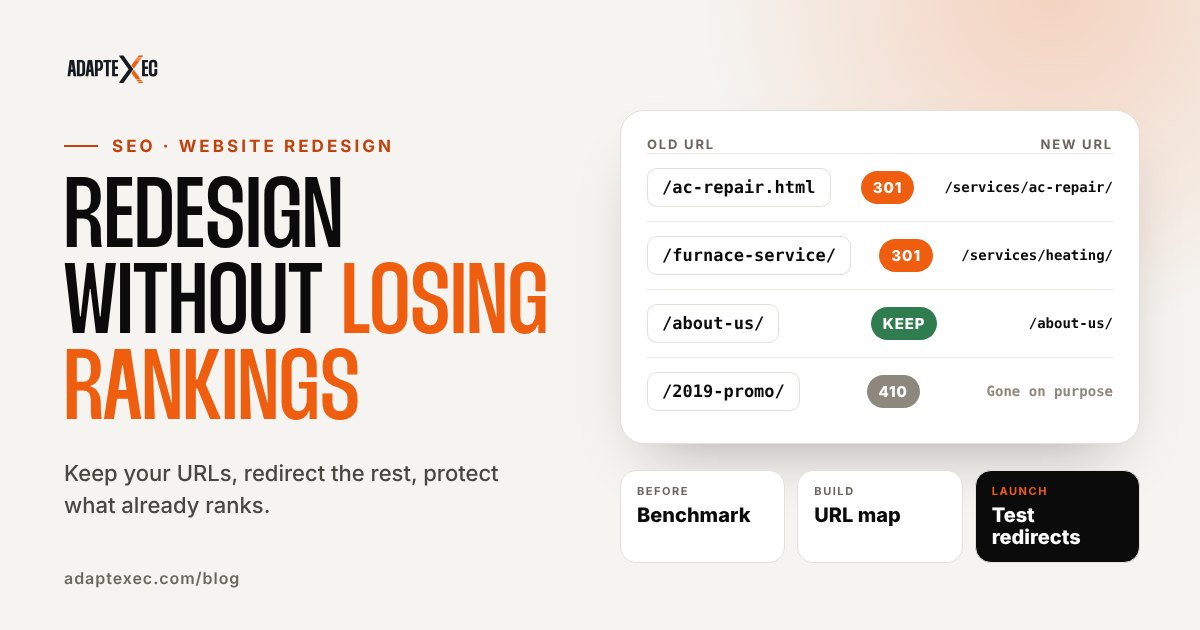
The URL map is the single most important document in a redesign. It’s a spreadsheet with every old URL, the new URL it becomes, and what happens to it. Google calls this out as a core step in any move with URL changes (Google Search Central: site moves).
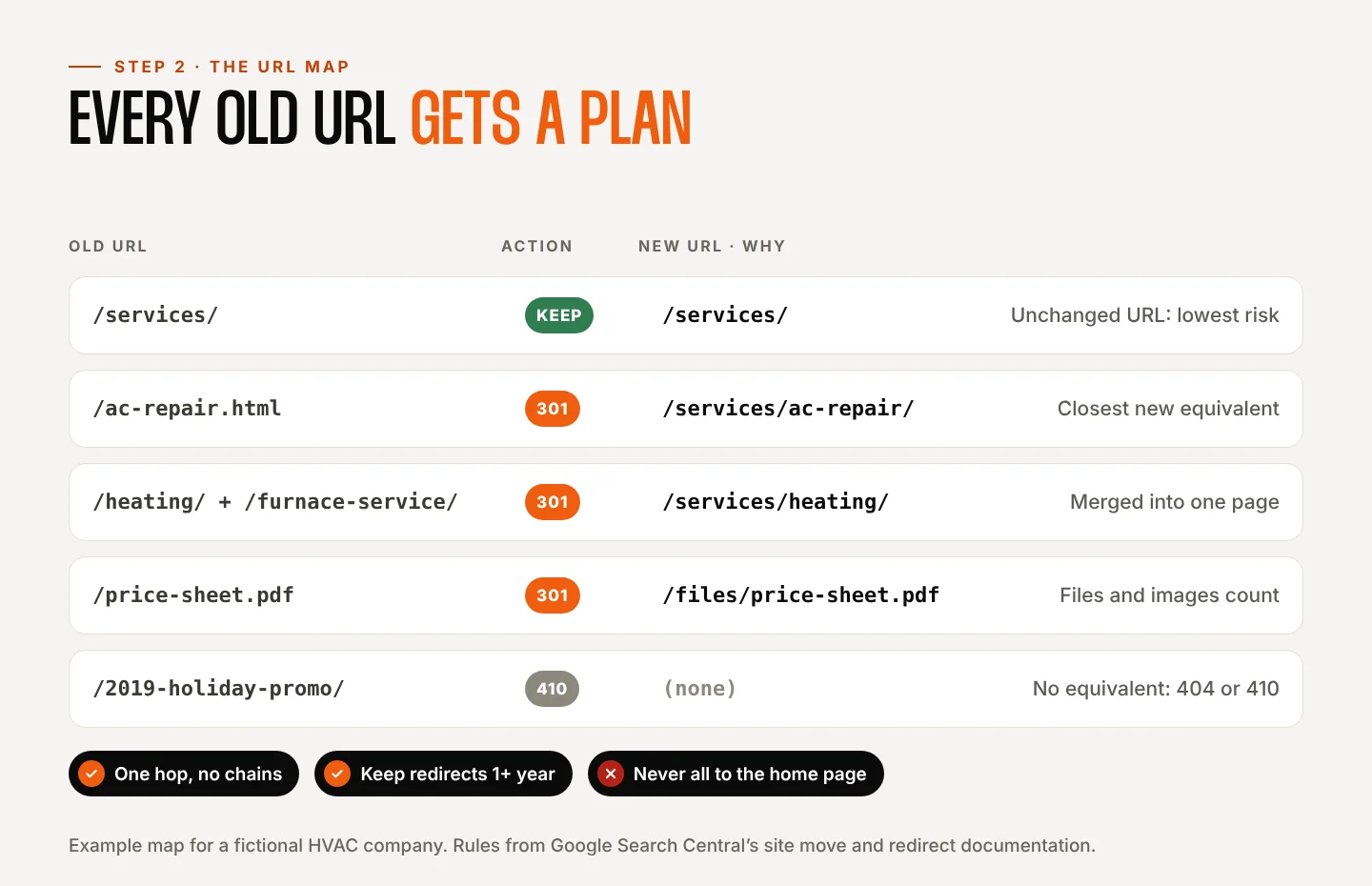
| Old URL | New URL | Action |
|---|---|---|
| /services/ | /services/ | Keep. No redirect needed. |
| /ac-repair.html | /services/ac-repair/ | 301 to the new equivalent |
| /heating/ and /furnace-service/ | /services/heating/ | 301 both to the consolidated page |
| /2019-holiday-promo/ | None | Return 404 or 410 (no real equivalent) |
| /wp-content/uploads/price-sheet.pdf | /files/price-sheet.pdf | 301 (files and images count too) |
Example map for a fictional HVAC company. Google’s guidance: redirect to the closest equivalent, consolidate where content was merged, and return 404 or 410 for content you’re not moving.
The simplest rule: if you don’t need to change a URL, don’t. Changing /ac-repair/ to /air-conditioning-repair-services/ for aesthetic reasons adds risk with no upside.
Step 3: Protect the content that already ranks
Redesigns often come with a push to “clean up” copy. That’s healthy for pages nobody visits. It’s risky for the pages that bring in search traffic. For every page in your top 20 (from the benchmark):
- Keep the substance. The topics, questions and details that page answers today should still be on the new page. Improve the writing; don’t remove what Google is ranking.
- Carry over titles and meta descriptions, or deliberately improve them. Don’t let the theme overwrite them.
- Keep the heading structure meaningful. One H1 that says what the page is about, H2s for real sections.
- Keep internal links. If the old service page linked to related services and FAQs, the new one should too.
- Keep structured data such as local business, FAQ or product markup, if you had it.
New pages, sections and better content are fine to add. Redesigns are a great time to fill gaps. Just add on top of what works rather than replacing it.
Step 4: Get redirects right
Google’s redirect documentation is clear on the fundamentals (Google Search Central: redirects):
- Use permanent, server-side redirects. HTTP 301 or 308 tells Google the new URL should be the one shown in search. Temporary redirects (302, 307) keep the old URL in results.
- Don’t worry about link credit. Google’s site move guide says 301 and other permanent redirects don’t cause a loss in PageRank.
- Avoid chains. Googlebot can follow up to 10 hops, but Google advises redirecting straight to the final destination, and if you can’t, keeping chains to ideally no more than three.
- Don’t send everything to the home page. Many old URLs pointing to one irrelevant page can be treated as a soft 404.
- Keep redirects for at least a year, and from a user’s perspective, consider keeping them indefinitely.
On WordPress, redirects usually live in a redirect plugin or your SEO plugin; on other platforms, in server configuration or the platform’s built-in redirect manager. Either is fine as long as the result is a real 301 that you’ve tested.
Step 5: The launch-day checklist
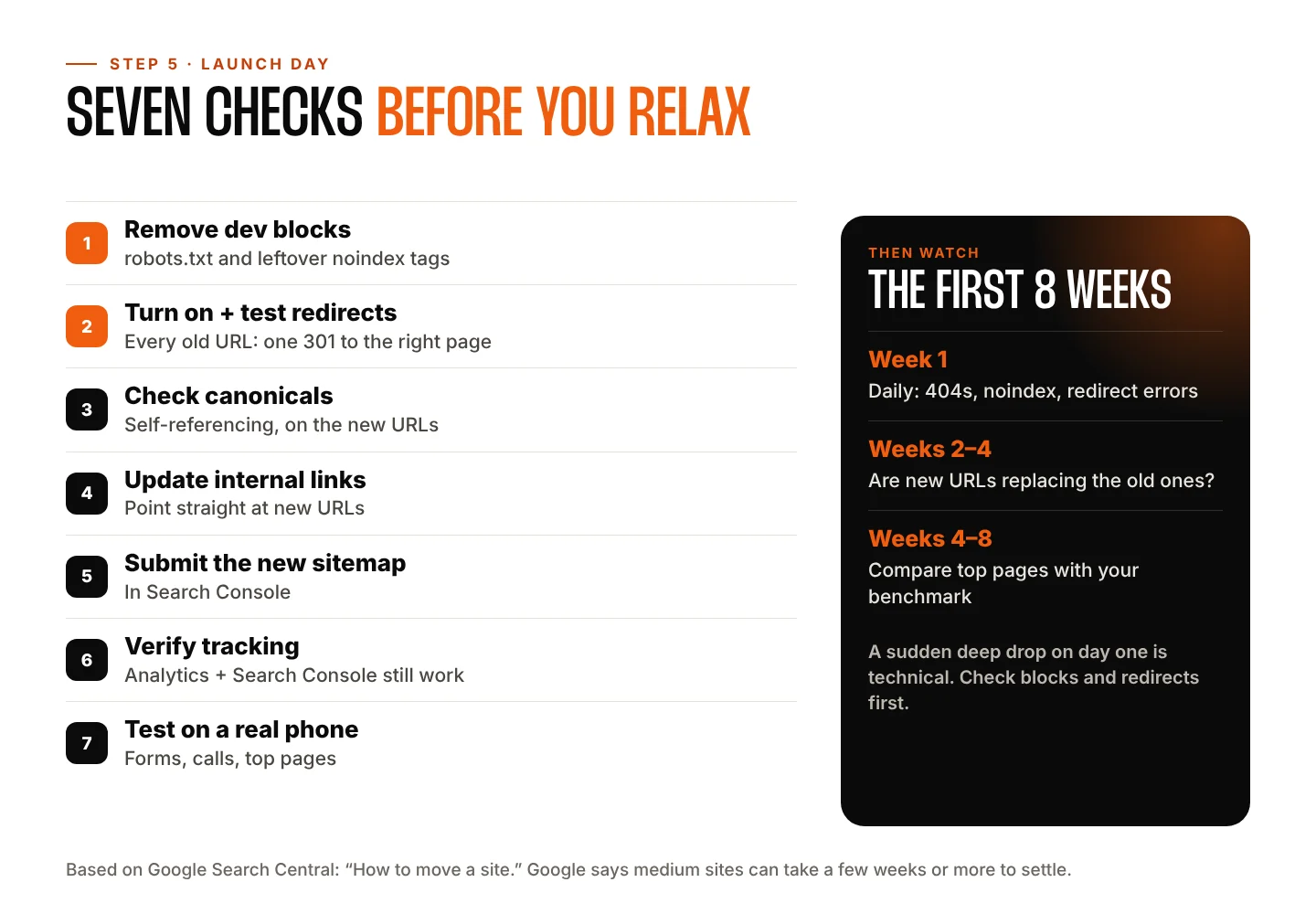
- Remove development blocks. Check robots.txt and make sure no page carries a leftover noindex tag. Google’s guide specifically warns about this.
- Turn on redirects and test them. Run your whole URL map through a crawler or script and confirm each old URL returns a single 301 to the right page.
- Check canonical tags. Each new page should have a self-referencing canonical pointing to its new URL.
- Update internal links to point directly at new URLs instead of relying on redirects.
- Submit the new sitemap in Search Console.
- Confirm analytics and Search Console verification still work. Verification files and tags are easy to lose in a rebuild.
- Test forms, calls and key pages on a real phone. Rankings mean nothing if the quote form broke.
Timing helps too. Google suggests launching during a seasonal or weekly traffic dip if you have one, so fewer visitors hit any early issues.
Step 6: Monitor for the first 8 weeks
Some movement after launch is normal. Google’s documentation says that for medium-sized websites it can take a few weeks or more for Google to start showing the new URLs instead of the old ones, and larger sites take longer. Rankings may fluctuate while Google recrawls and reindexes, then settle.
What to watch, weekly:
- Search Console Pages report: new 404s, “Excluded by noindex” and redirect errors.
- Top pages from your benchmark: are the new URLs picking up the clicks the old ones had?
- Leads and calls: the number that actually matters.
A gradual dip that recovers is normal. A sudden, deep drop on day one or two almost always means something technical: a blocked crawl, a noindex tag, or a redirect rule that isn’t firing. Check those first.
Redesign, new domain, new platform: one at a time
If you’re also changing your domain name or moving to a new CMS, Google’s advice is to plan changes one after the other rather than all at once: for example, move to the new domain first, then change the layout. Each change is easier to monitor and fix on its own.
Changing hosts without changing URLs is the lowest-risk move of all. Google has a separate, shorter guide for it, focused on testing the new hosting and switching DNS (Google Search Central: changing your hosting).
How AdaptExec handles website redesigns
When we rebuild a site, the SEO migration is part of the project, not an add-on. We benchmark the current site, build and test the URL map, carry over the content and metadata that ranks, and check redirects, canonicals and indexing on launch day. You can see the kind of sites we build in our portfolio, and how we approach search on our SEO services page.
Our custom websites start around $900, and every quote is custom. Once your project is paid in full, you own the site. There’s no long-term contract or required monthly plan, and ongoing SEO is available if you want it, never required. If you’re still budgeting, our website cost guide breaks down typical ranges, and if you serve customers at their homes or job sites, our local SEO guide for service-area businesses covers what to build into the new site.
Website redesign SEO FAQ
Will a website redesign hurt my SEO?
It doesn’t have to. Most ranking losses come from changed URLs without redirects, deleted content or development settings left on at launch. Keep URLs where you can, 301-redirect the rest to their closest equivalents, and keep the content that ranks.
How long does it take rankings to recover after a redesign?
Google says medium-sized sites can take a few weeks or more for the new URLs to replace the old ones in search, and larger sites longer. Small fluctuations during that window are normal. A sudden deep drop usually points to a technical problem.
Do 301 redirects lose link value?
According to Google’s site move documentation, 301 and other permanent redirects don’t cause a loss in PageRank. Redirect to the most relevant new page, avoid chains, and keep redirects in place for at least a year.
Should I change my URLs during a redesign?
Only when there’s a real reason, such as messy file-based URLs or merging duplicate pages. Unchanged URLs carry the least risk. If you do change them, every old URL needs a permanent redirect.
What is a URL map?
A spreadsheet listing every old URL, the new URL it becomes, and the action: keep, 301 redirect, consolidate, or return a 404 or 410. It’s the backbone of a safe redesign and the checklist you test against on launch day.
Sources
- Google Search Central: How to move a site (site moves with URL changes), accessed October 2026.
- Google Search Central: Redirects and Google Search, accessed October 2026.
- Google Search Central: Changing your hosting, accessed October 2026.